
TeamMind
TeamMind
TeamMind
TeamMind is a RAG- AI powered collaboration platform designed to help distributed teams work smarter and faster. By centralising project files, automating approval workflows, and offering instant answers with contextual AI search,
TeamMind is a RAG- AI powered collaboration platform designed to help distributed teams work smarter and faster. By centralising project files, automating approval workflows, and offering instant answers with contextual AI search,
Problem
Problem

Knowledge fragmentation: scattered project files and decisions across multiple tools make information retrieval inefficient.
Knowledge fragmentation: scattered project files and decisions across multiple tools make information retrieval inefficient.

Asynchronous collaboration delays: waiting for approval or updates slows down workflows in distributed teams.
Asynchronous collaboration delays: waiting for approval or updates slows down workflows in distributed teams.

Frequent work interruptions: routine queries and status requests disrupt deep focus and reduce productivity.
Frequent work interruptions: routine queries and status requests disrupt deep focus and reduce productivity.

Dependency on key individuals for information, creating bottlenecks and risks if unavailable.
Dependency on key individuals for information, creating bottlenecks and risks if unavailable.
Solution
Solution
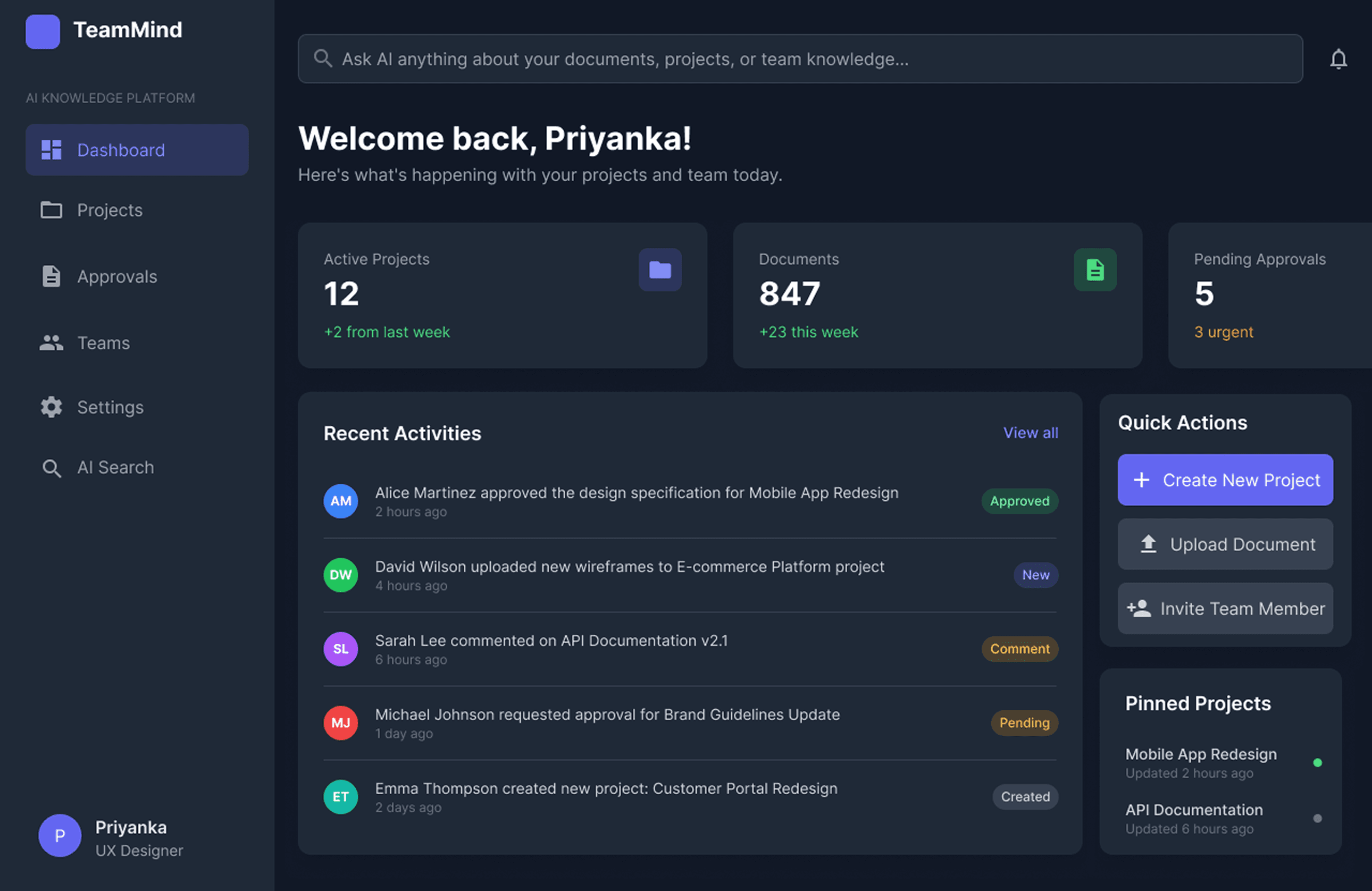
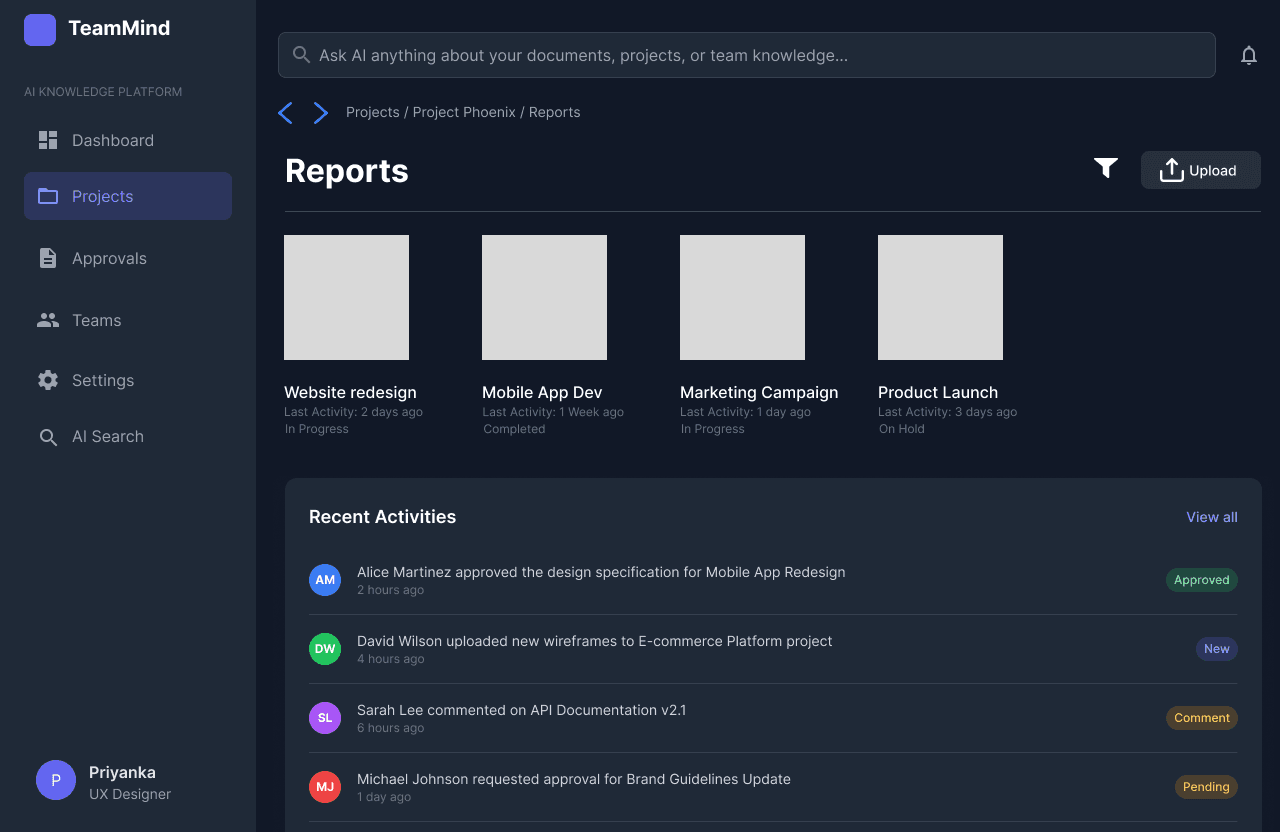
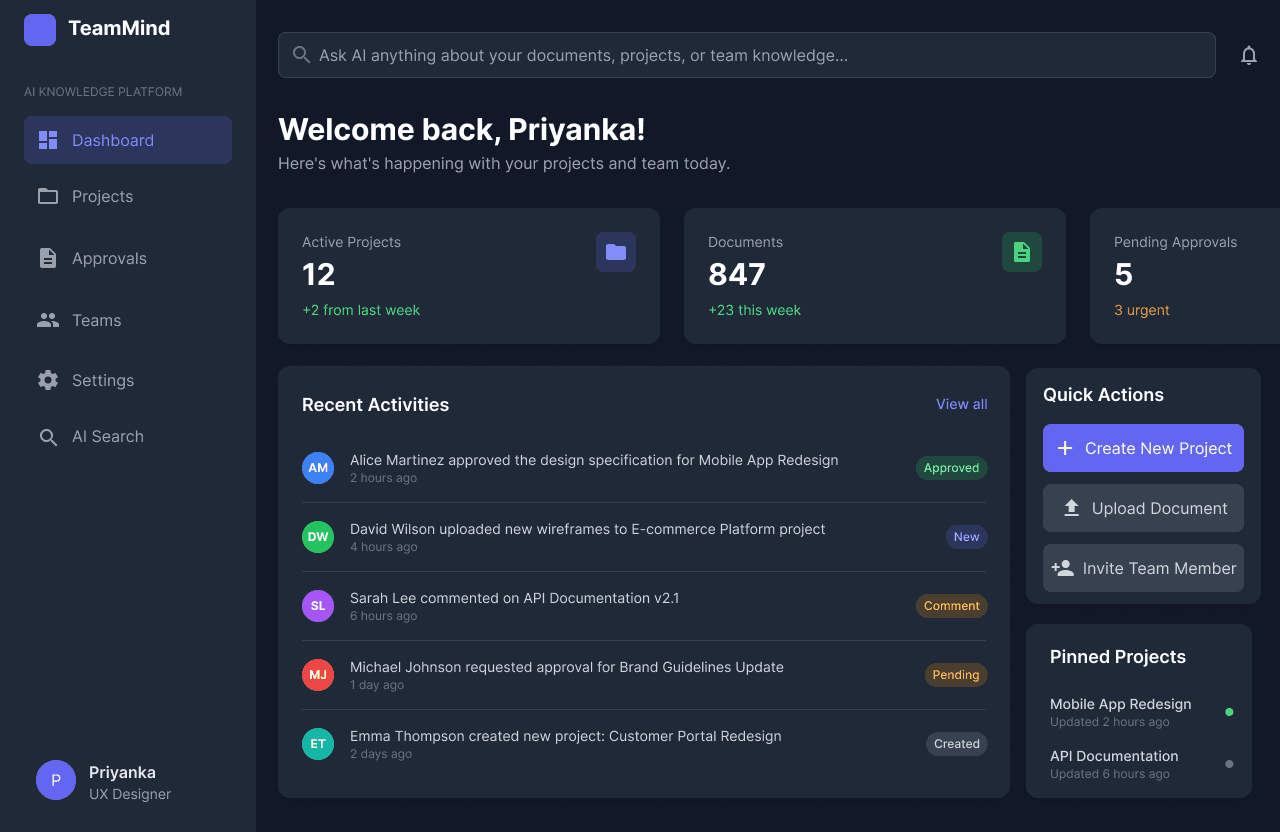
Dashboard with Recent Activities & Quick Actions
Presents an overview of ongoing projects, urgent tasks, recent activity, and quick actions like creating projects or uploading documents. This boosts user autonomy, reduces mental load, and helps users stay focused without frequent context switches.
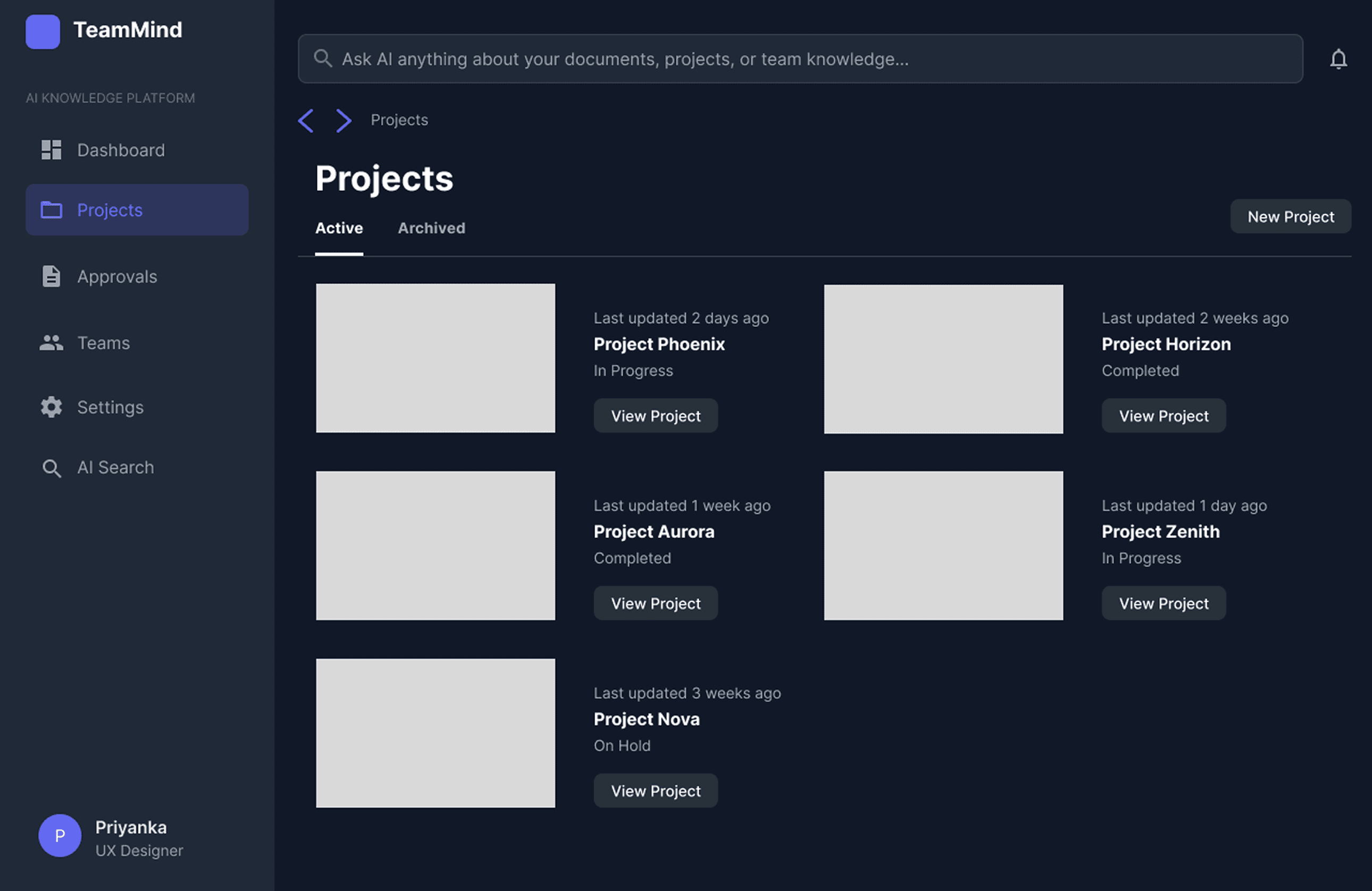
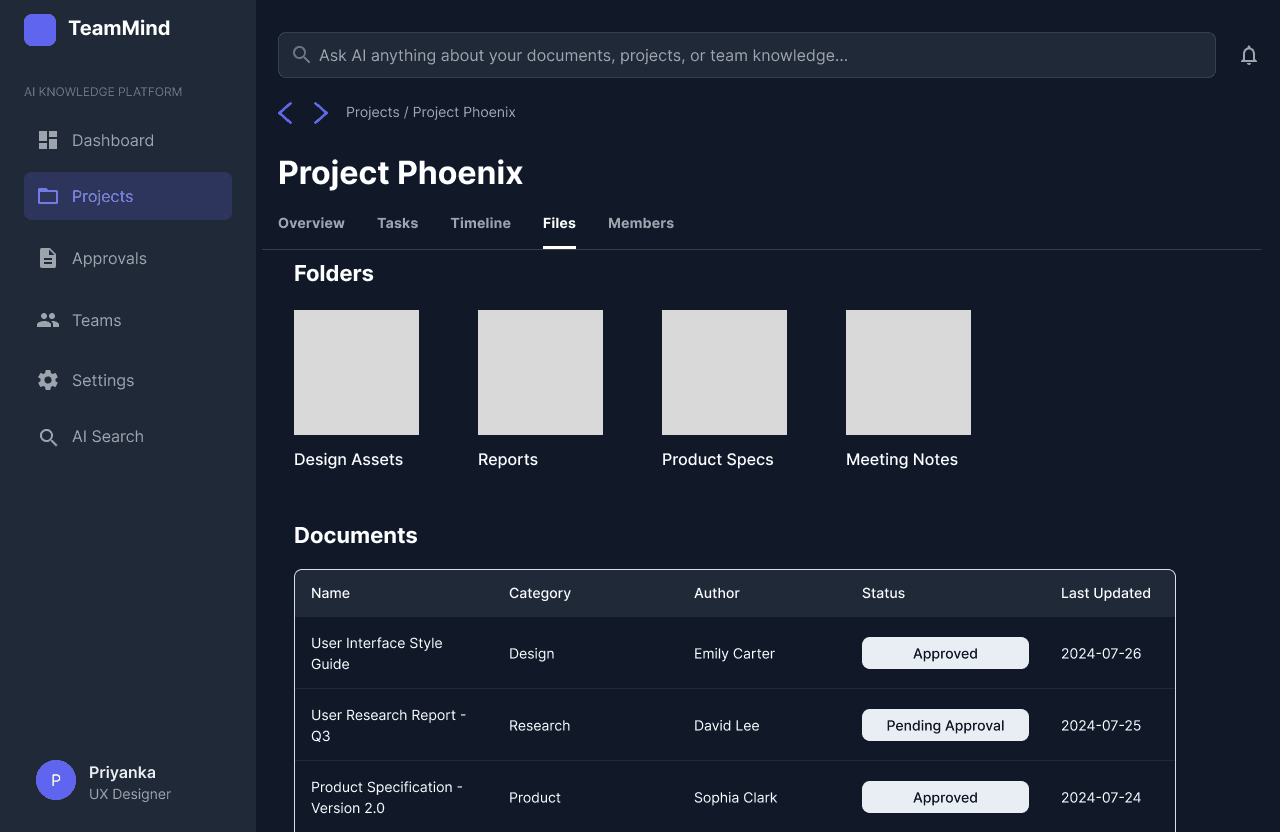
Projects Overview Screen
Centralizes access to all active and archived projects, enabling users to quickly locate and switch between project workspaces. This tackles knowledge fragmentation by bringing all projects into one unified entry point.
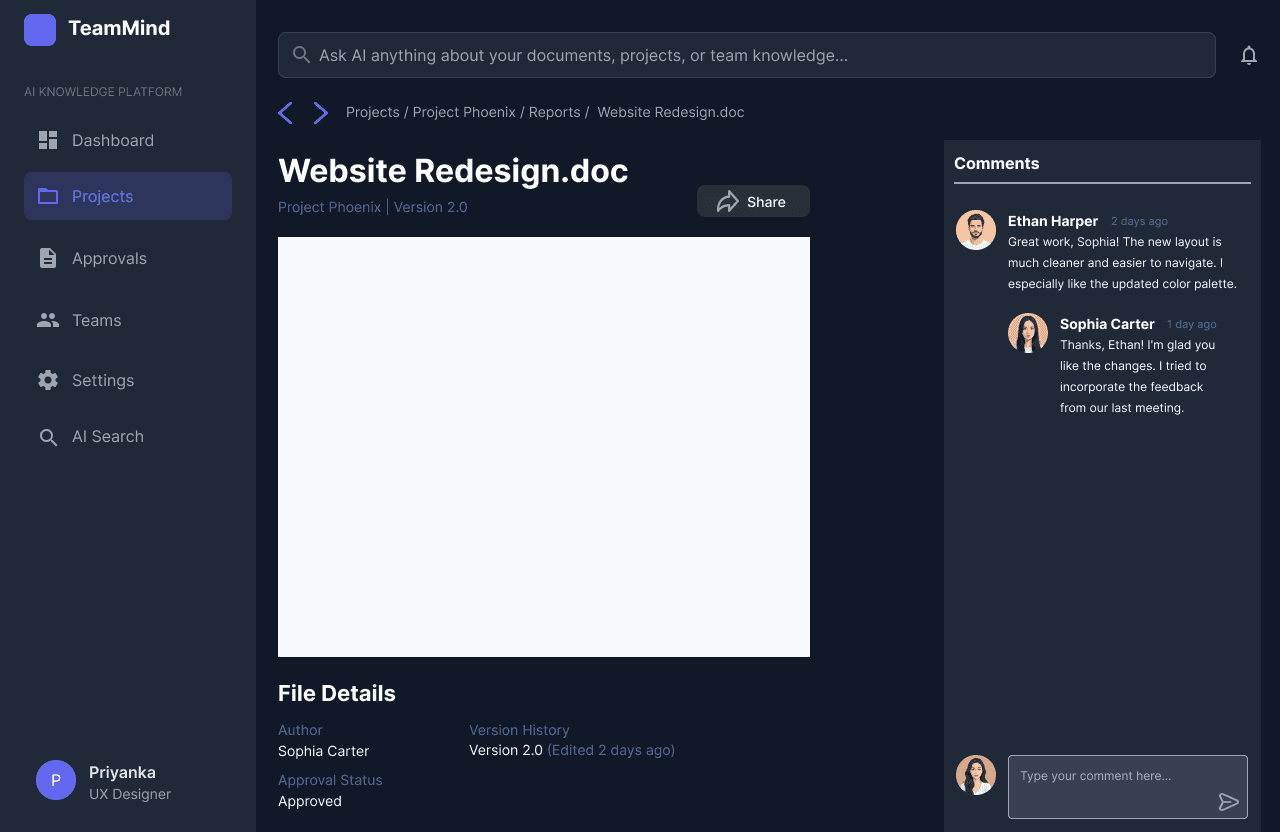
Document Details, Sharing & Collaboration Panel
By allowing users to add comments and tag teammates directly on a project file, this screen centralizes collaboration around key documents. Team discussions and feedback are anchored to files, reducing interruptions and making asynchronous teamwork efficient. Approval status and author details at the bottom reinforce transparency and traceability.
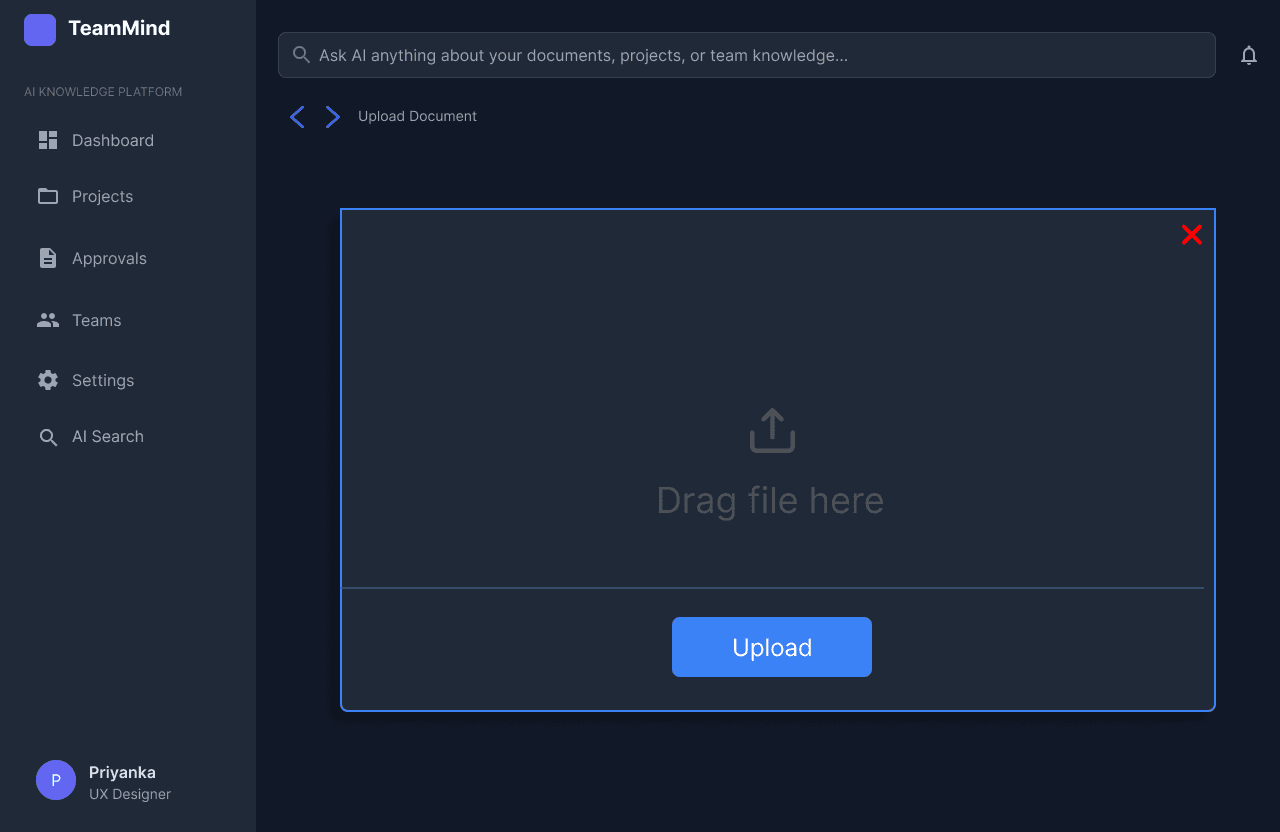
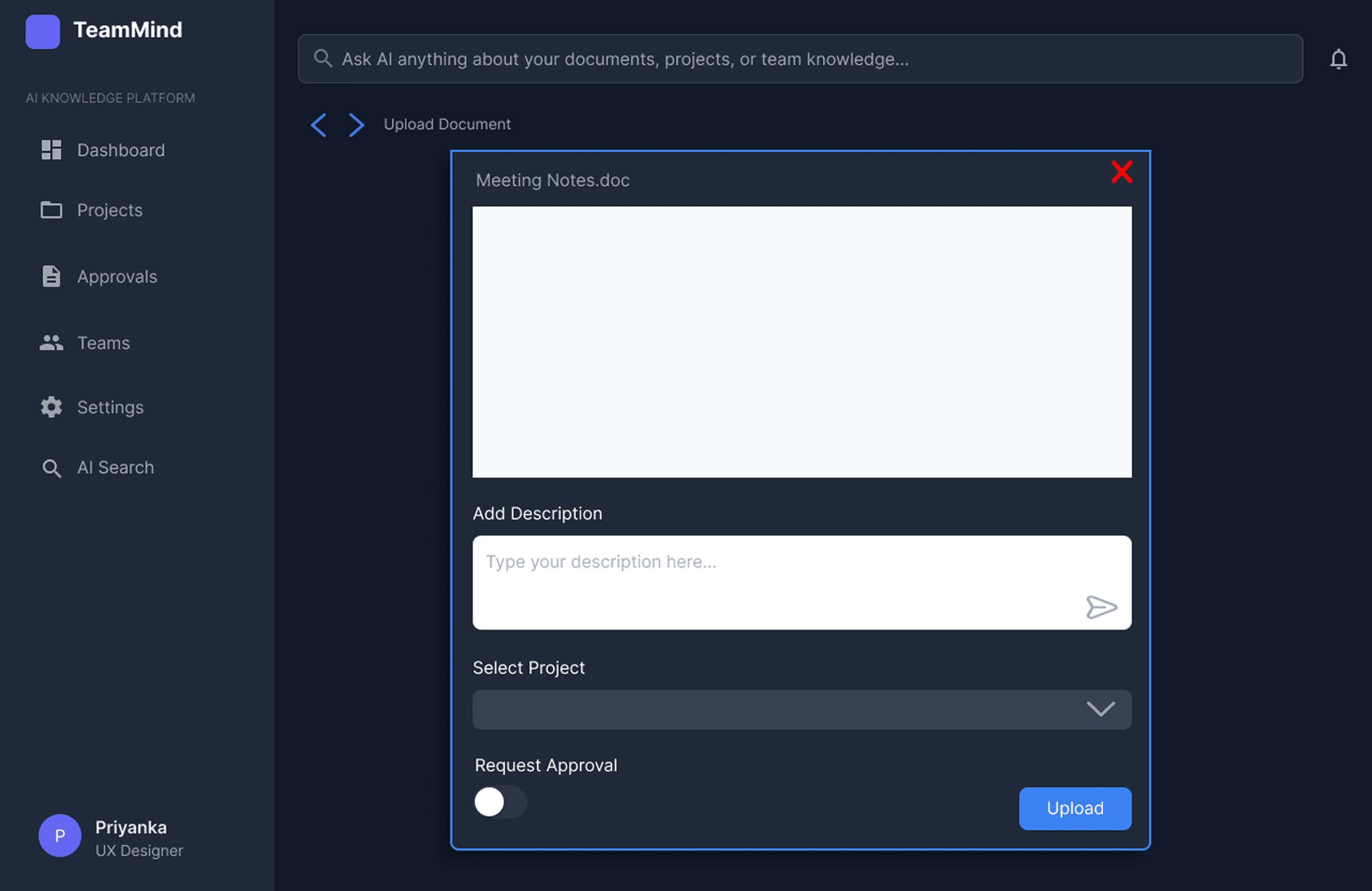
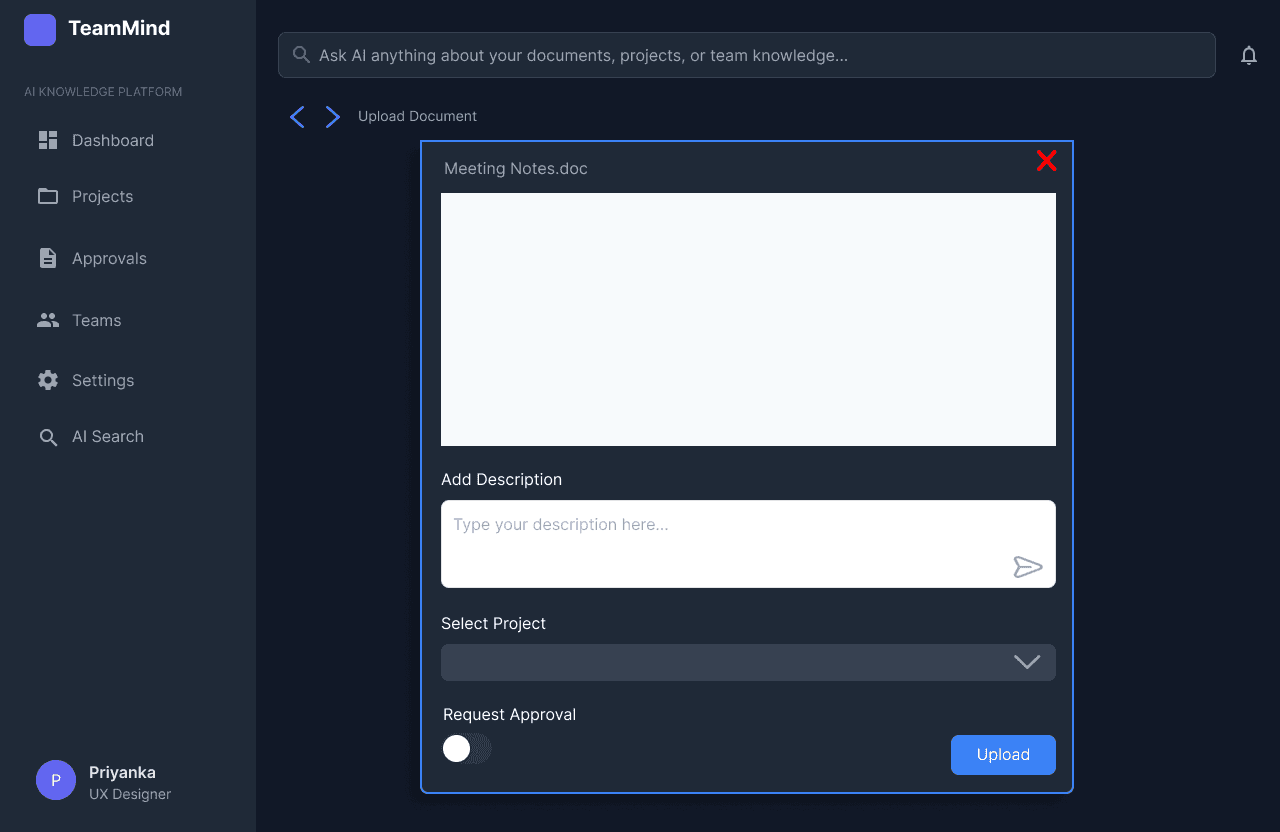
Document Upload & Approval Request
This screen allows users to upload new documents with a custom description, assign the document to a specific project, and instantly request approval with a single click. By streamlining file addition and approval initiation, it reduces bottlenecks and makes it easy for team members to keep important project files current and visible, supporting efficient collaboration and proactive workflow management.
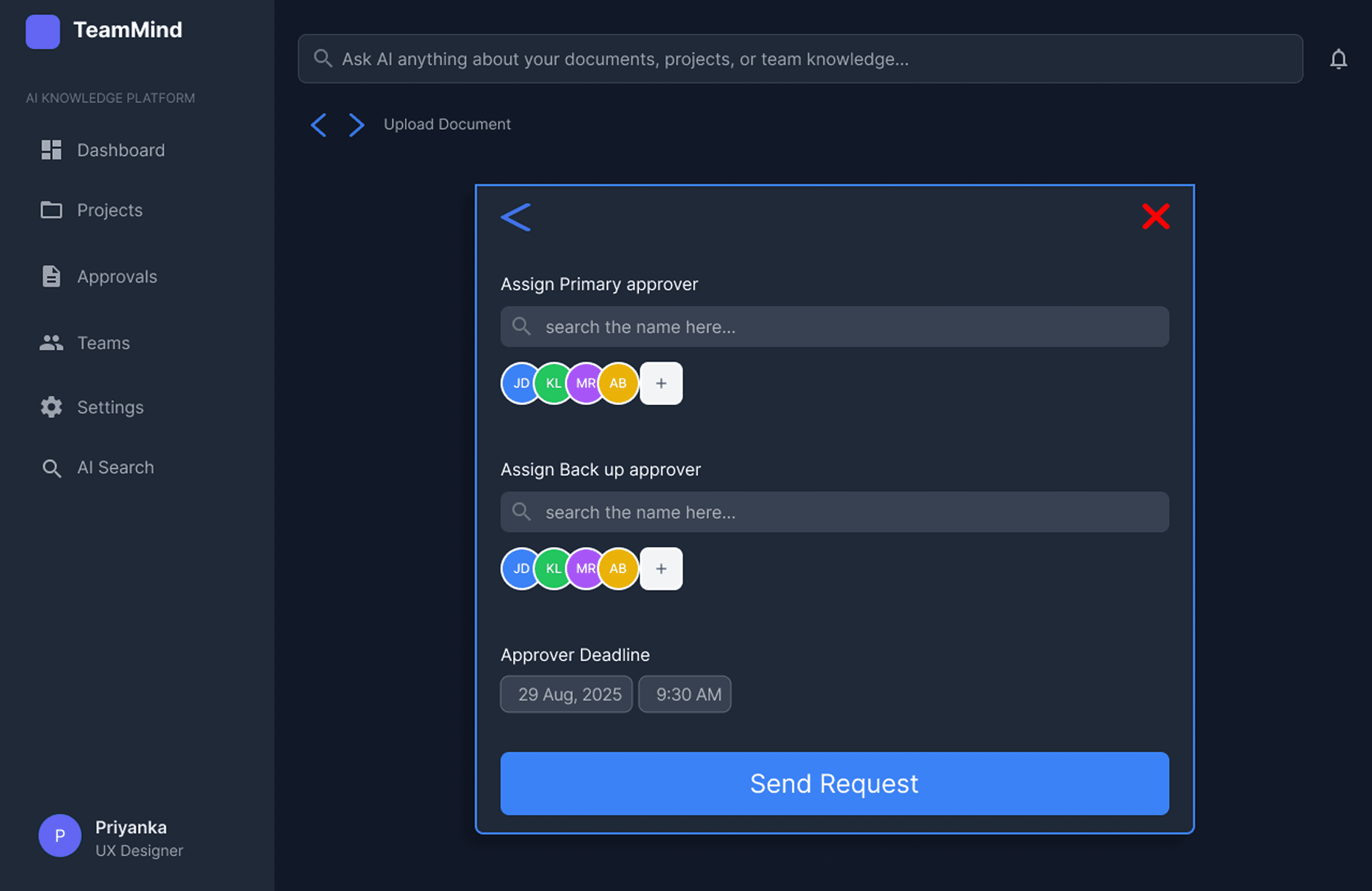
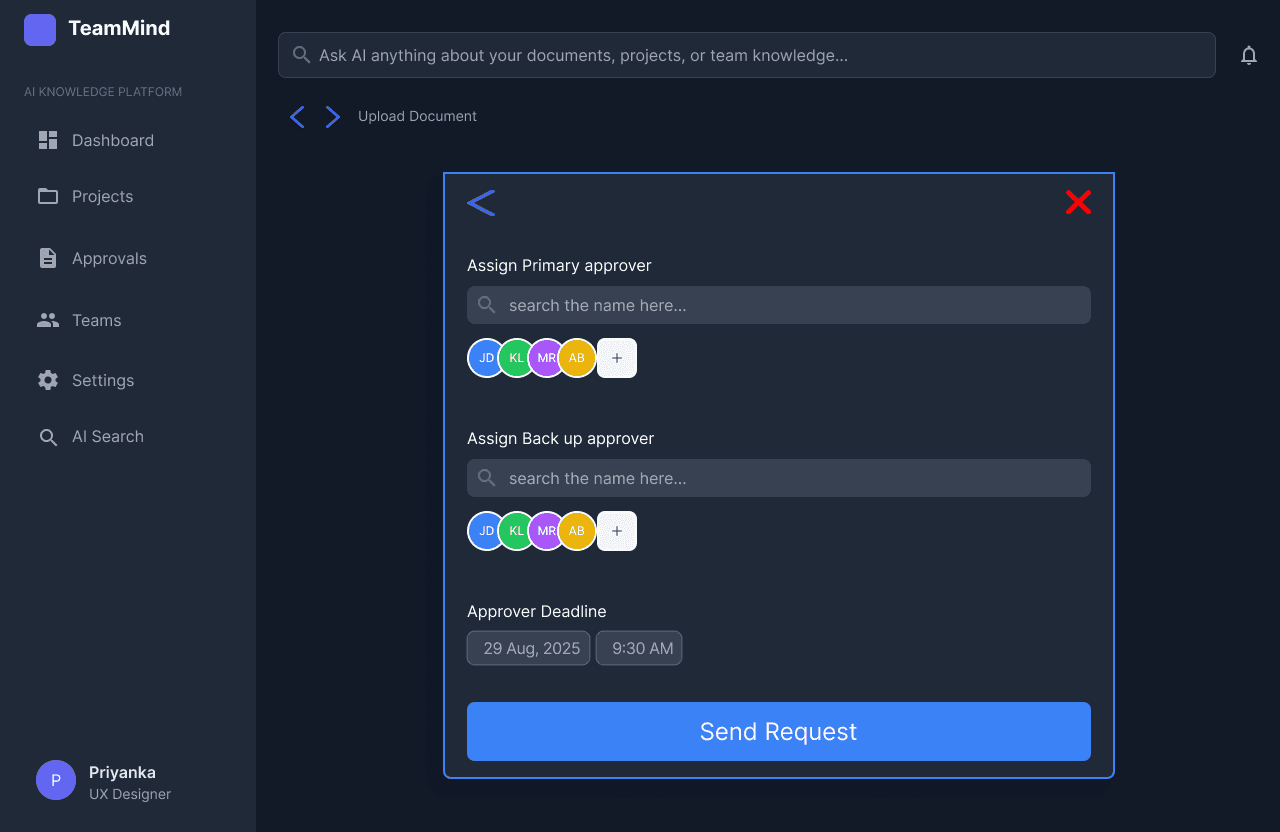
Document Upload & Approval Workflow Screen
This is the document approval workflow screen, where users assign both primary and backup approvers and set deadlines for review. The interface automates and streamlines document approval requests, minimizing bottlenecks and delays in project progress, and reducing dependency on single individuals.
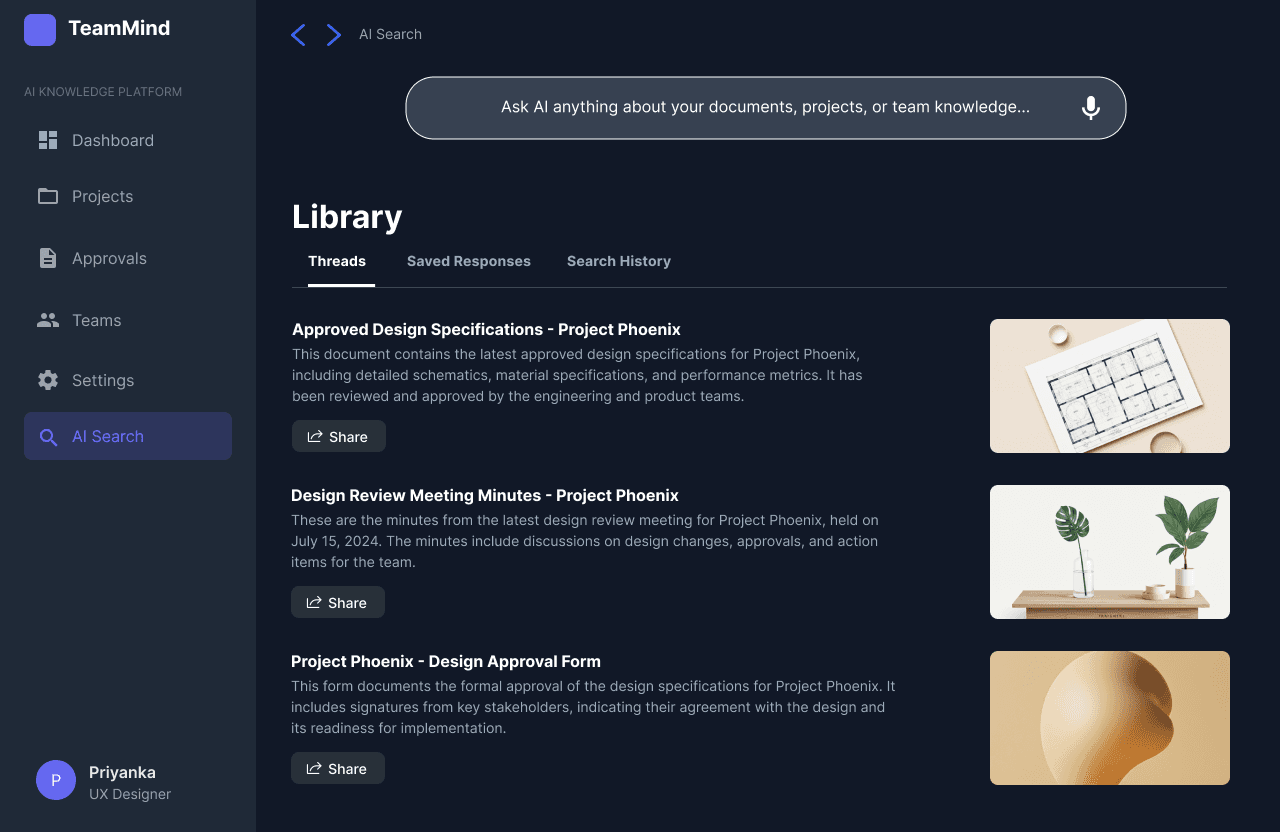
AI Search Library & Contextual Document Threads
The AI Search library view presents contextual document threads and saved responses. It smartly organises project documentation, supporting fast retrieval of project knowledge and simplifying onboarding for distributed teams. Users save time and maintain productivity with relevant, organised document insights.
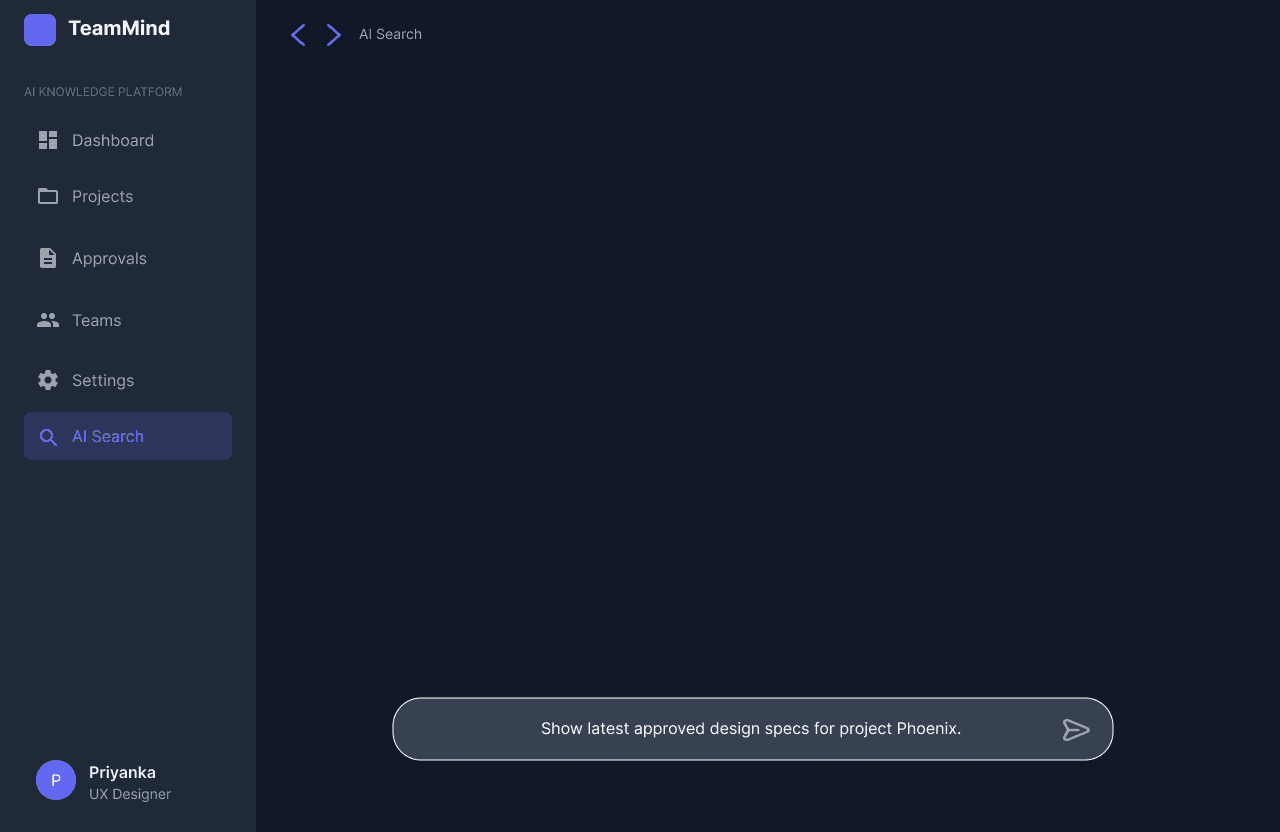
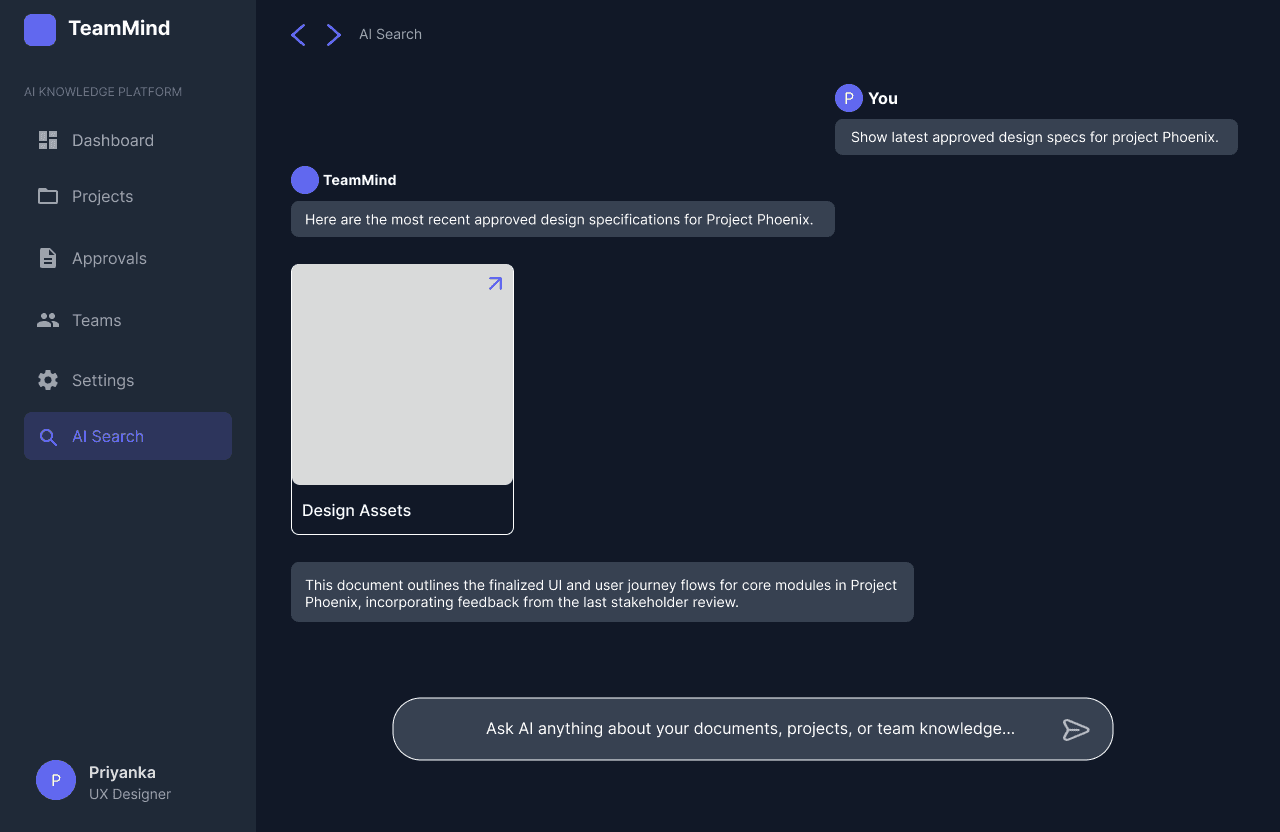
AI-Powered Project Knowledge Query
This screen enables users to directly query recent approvals and project documentation using an AI-powered search bar. By surfacing the latest approved documentation in response to a natural language request, it tackles knowledge fragmentation and empowers new or existing team members to quickly access key project information without manual searching.
Prompt Refinement and Grounding
The AI proactively asks clarifying questions, prompting users to refine their input and establish common ground, thereby reducing miscommunication
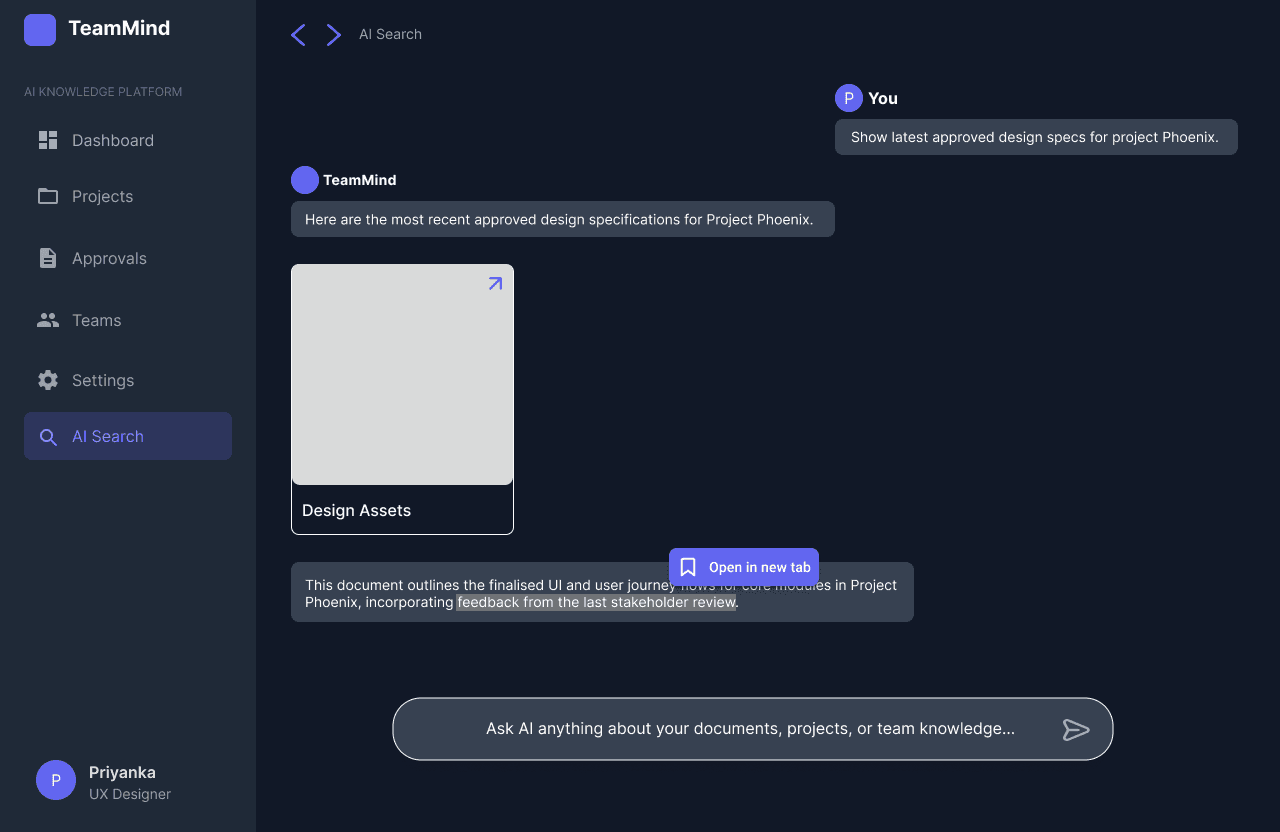
Non-Linear Exploration via Branching Tabs
Users can highlight any text within the conversation, triggering a prompt to open a new tab for a parallel, related search.
Each new tab represents a branching topic that can be explored independently, supporting open-ended, multi-level investigation
Research
Research
Secondary Research
Secondary Research
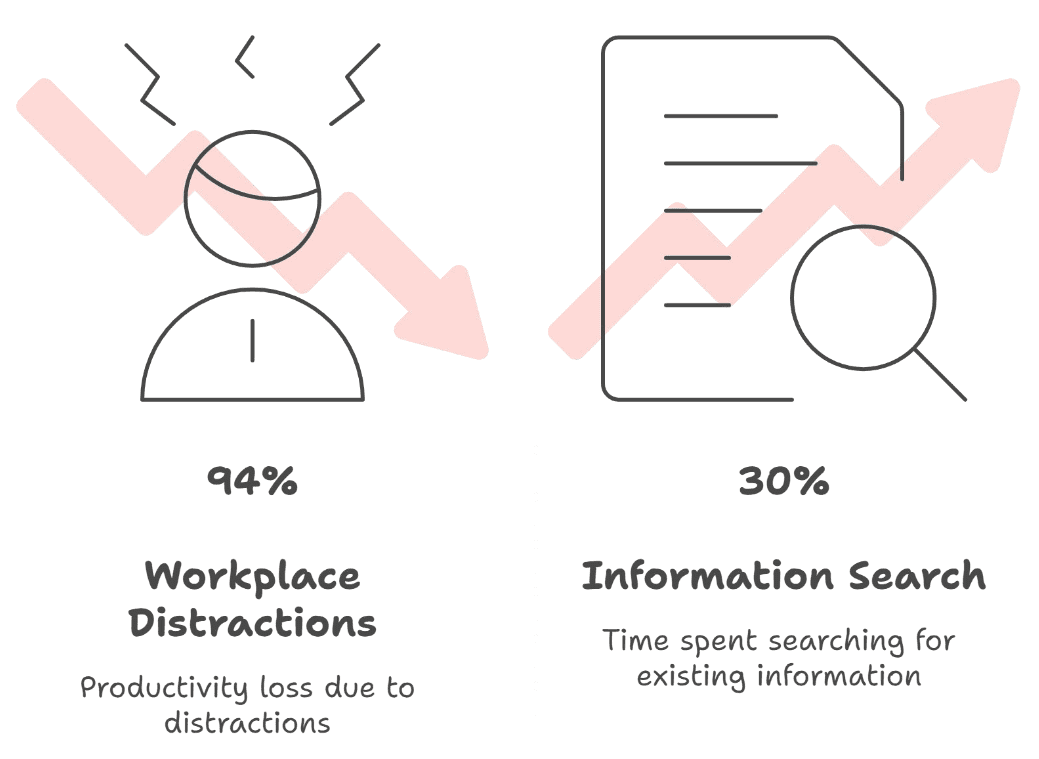
In today’s digital-first workplace, distributed and remote teams have become the norm, with over 70% of global organisations now supporting hybrid or fully remote work models.
In today’s digital-first workplace, distributed and remote teams have become the norm, with over 70% of global organisations now supporting hybrid or fully remote work models.
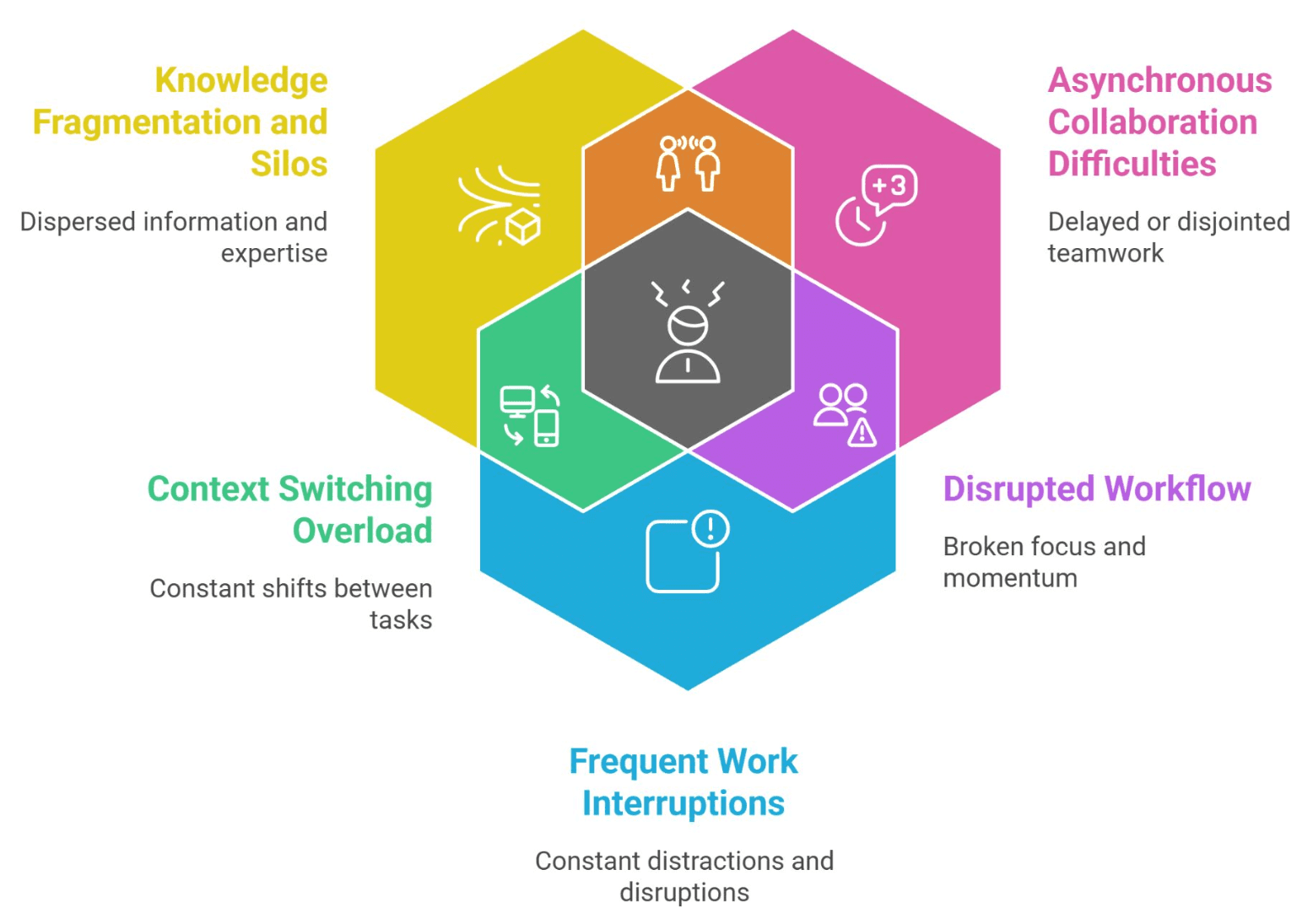
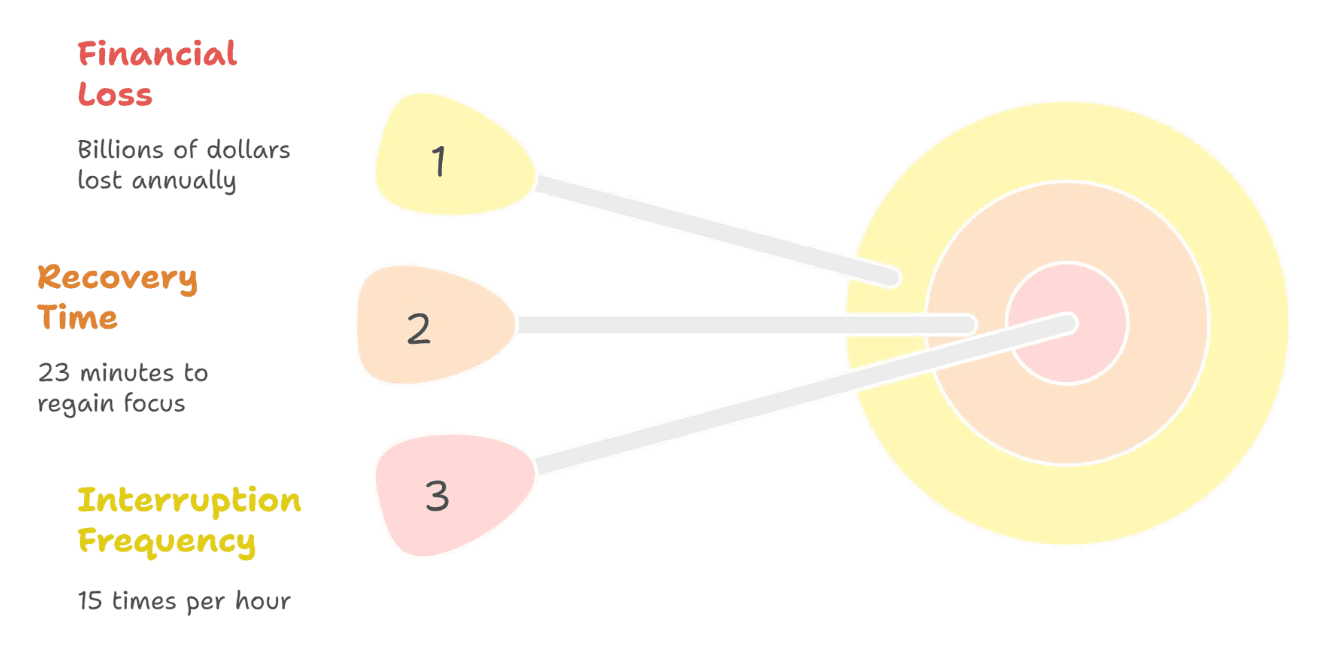
These distributed IT teams grapple with three core, interconnected challenges:
knowledge fragmentation and silos,
asynchronous collaboration difficulty
frequent work interruptions
These distributed IT teams grapple with three core, interconnected challenges:
knowledge fragmentation and silos,
asynchronous collaboration difficulty
frequent work interruptions
Limitations of current LLM interfaces
Limitations of current LLM interfaces
Fuzzy Abstraction Matching problem
Fuzzy Abstraction Matching problem
Users often struggle to create effective prompts, leading to ambiguous or irrelevant AI responses, especially when lacking subject knowledge
Users often struggle to create effective prompts, leading to ambiguous or irrelevant AI responses, especially when lacking subject knowledge
Linear Conversation Structure
Linear Conversation Structure
Current AI interfaces are predominantly linear, making it difficult for users to revisit or refine previous queries, and limiting open-ended, exploratory search
Current AI interfaces are predominantly linear, making it difficult for users to revisit or refine previous queries, and limiting open-ended, exploratory search

Design goals and opportunities
Cognitive load reduction: help users formulate clearer prompts and manage information.
Non-linear search: allow users to explore parallel topics and revisit queries.
Design goals and opportunities
Cognitive load reduction: help users formulate clearer prompts and manage information.
Non-linear search: allow users to explore parallel topics and revisit queries.
Design goals and opportunities
Cognitive load reduction: help users formulate clearer prompts and manage information.
Non-linear search: allow users to explore parallel topics and revisit queries.
Building on the challenges identified in secondary research, especially the impact of fragmented tools and communication on workflow burdens, I set out to hear directly from users.
Building on the challenges identified in secondary research, especially the impact of fragmented tools and communication on workflow burdens, I set out to hear directly from users.
Dashboard with Recent Activities & Quick Actions
Presents an overview of ongoing projects, urgent tasks, recent activity, and quick actions like creating projects or uploading documents. This boosts user autonomy, reduces mental load, and helps users stay focused without frequent context switches.
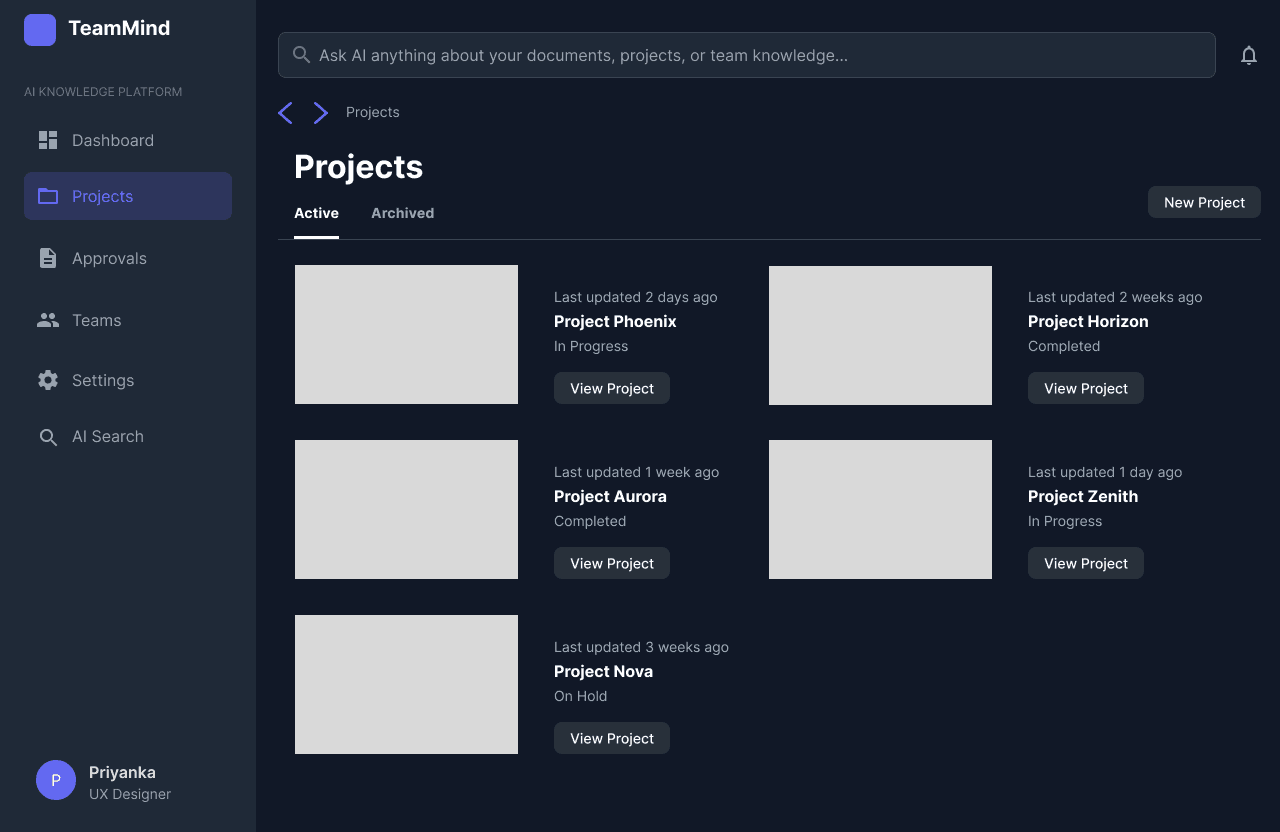
Projects Overview Screen
Centralizes access to all active and archived projects, enabling users to quickly locate and switch between project workspaces. This tackles knowledge fragmentation by bringing all projects into one unified entry point.
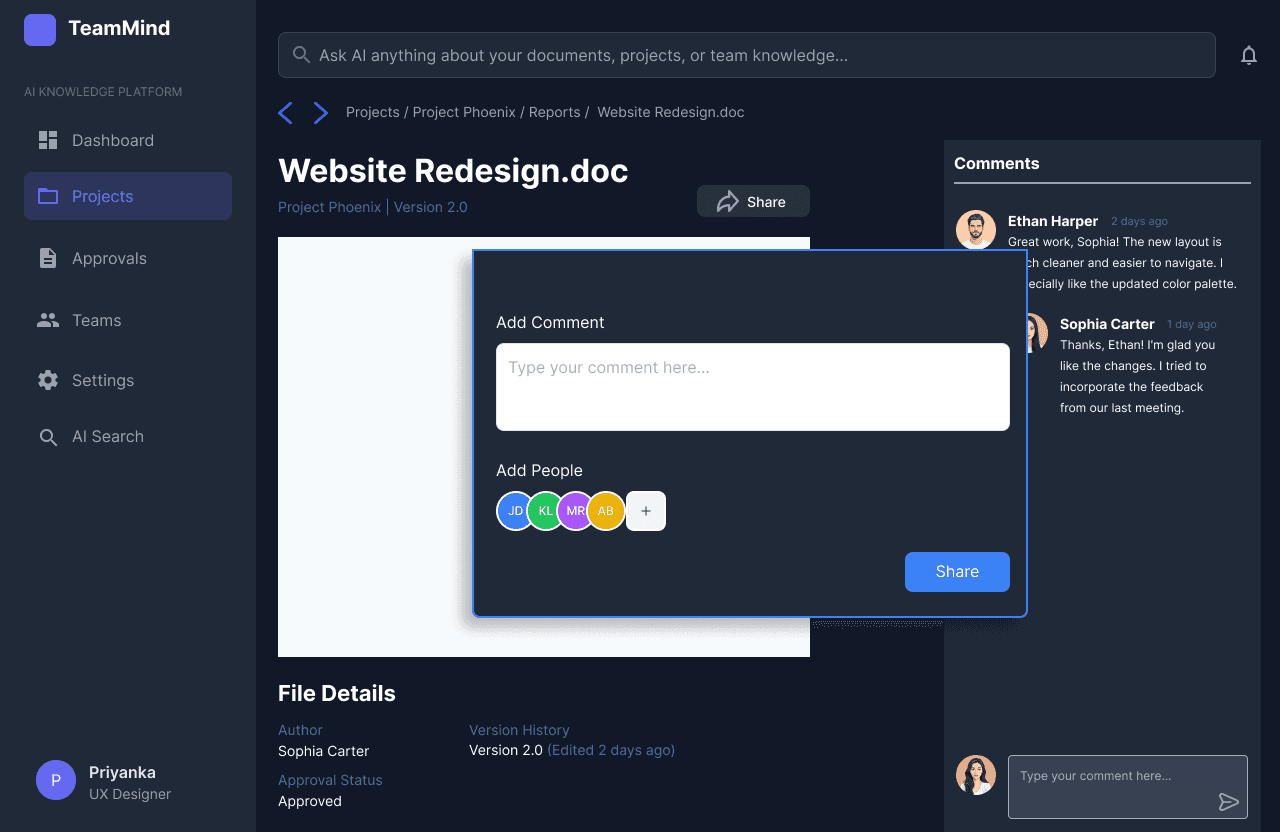
Document Details, Sharing & Collaboration Panel
By allowing users to add comments and tag teammates directly on a project file, this screen centralizes collaboration around key documents. Team discussions and feedback are anchored to files, reducing interruptions and making asynchronous teamwork efficient. Approval status and author details at the bottom reinforce transparency and traceability.
Document Upload & Approval Request
This screen allows users to upload new documents with a custom description, assign the document to a specific project, and instantly request approval with a single click. By streamlining file addition and approval initiation, it reduces bottlenecks and makes it easy for team members to keep important project files current and visible, supporting efficient collaboration and proactive workflow management.
Document Upload & Approval Workflow Screen
This is the document approval workflow screen, where users assign both primary and backup approvers and set deadlines for review. The interface automates and streamlines document approval requests, minimizing bottlenecks and delays in project progress, and reducing dependency on single individuals.
AI Search Library & Contextual Document Threads
The AI Search library view presents contextual document threads and saved responses. It smartly organises project documentation, supporting fast retrieval of project knowledge and simplifying onboarding for distributed teams. Users save time and maintain productivity with relevant, organised document insights.
AI-Powered Project Knowledge Query
This screen enables users to directly query recent approvals and project documentation using an AI-powered search bar. By surfacing the latest approved documentation in response to a natural language request, it tackles knowledge fragmentation and empowers new or existing team members to quickly access key project information without manual searching.
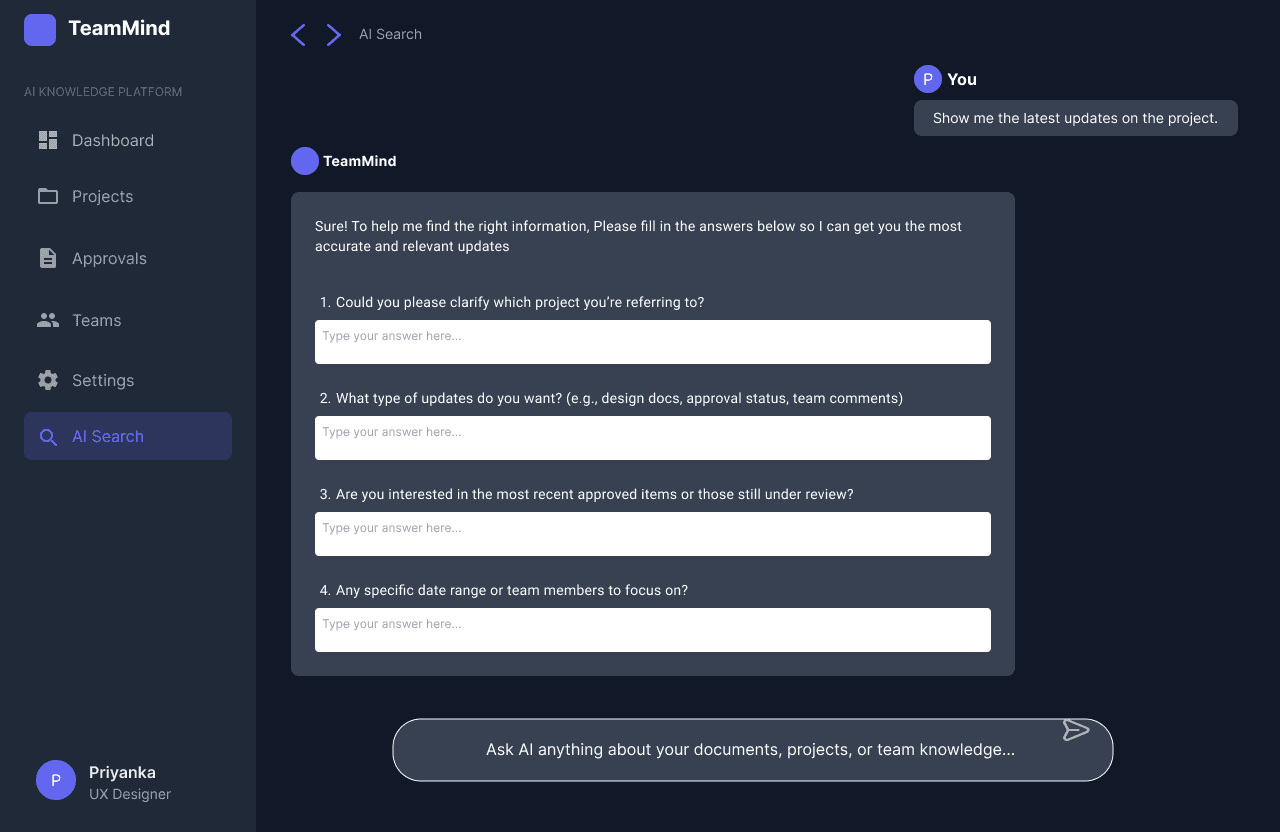
Prompt Refinement and Grounding
The AI proactively asks clarifying questions, prompting users to refine their input and establish common ground, thereby reducing miscommunication
Non-Linear Exploration via Branching Tabs
Users can highlight any text within the conversation, triggering a prompt to open a new tab for a parallel, related search.
Each new tab represents a branching topic that can be explored independently, supporting open-ended, multi-level investigation
Primary Research
Primary Research
Affinity Mapping
Affinity Mapping
Through in-depth interviews and affinity mapping, it became clear that, information fragmentation, collaboration delays, frequent workflow interruptions, and a strong desire for self-service access were everyday realities for teams.
Through in-depth interviews and affinity mapping, it became clear that, information fragmentation, collaboration delays, frequent workflow interruptions, and a strong desire for self-service access were everyday realities for teams.
Insights
Information Fragmentation: Difficulty finding key files, decisions, and documents scattered across multiple tools, causing frustration and wasted effort.
Collaboration Delays: Frequent lags in communication and workflows, especially when waiting for asynchronous approvals or unavailable teammates.
Interruptions and Disruption: Routine queries and small requests disrupt deep work, increasing stress and reducing focus.
Desire for Self-Service Knowledge: Strong need for quick, independent access to project history and updates without bothering colleagues.
Insights
Information Fragmentation: Difficulty finding key files, decisions, and documents scattered across multiple tools, causing frustration and wasted effort.
Collaboration Delays: Frequent lags in communication and workflows, especially when waiting for asynchronous approvals or unavailable teammates.
Interruptions and Disruption: Routine queries and small requests disrupt deep work, increasing stress and reducing focus.
Desire for Self-Service Knowledge: Strong need for quick, independent access to project history and updates without bothering colleagues.
Insights
Information Fragmentation: Difficulty finding key files, decisions, and documents scattered across multiple tools, causing frustration and wasted effort.
Collaboration Delays: Frequent lags in communication and workflows, especially when waiting for asynchronous approvals or unavailable teammates.
Interruptions and Disruption: Routine queries and small requests disrupt deep work, increasing stress and reducing focus.
Desire for Self-Service Knowledge: Strong need for quick, independent access to project history and updates without bothering colleagues.
I expanded the research through an observational study analysing real-world conversations on online forums related to digital teamwork and collaboration. This approach validated previously identified pain points and surfaced new insights
I expanded the research through an observational study analysing real-world conversations on online forums related to digital teamwork and collaboration. This approach validated previously identified pain points and surfaced new insights
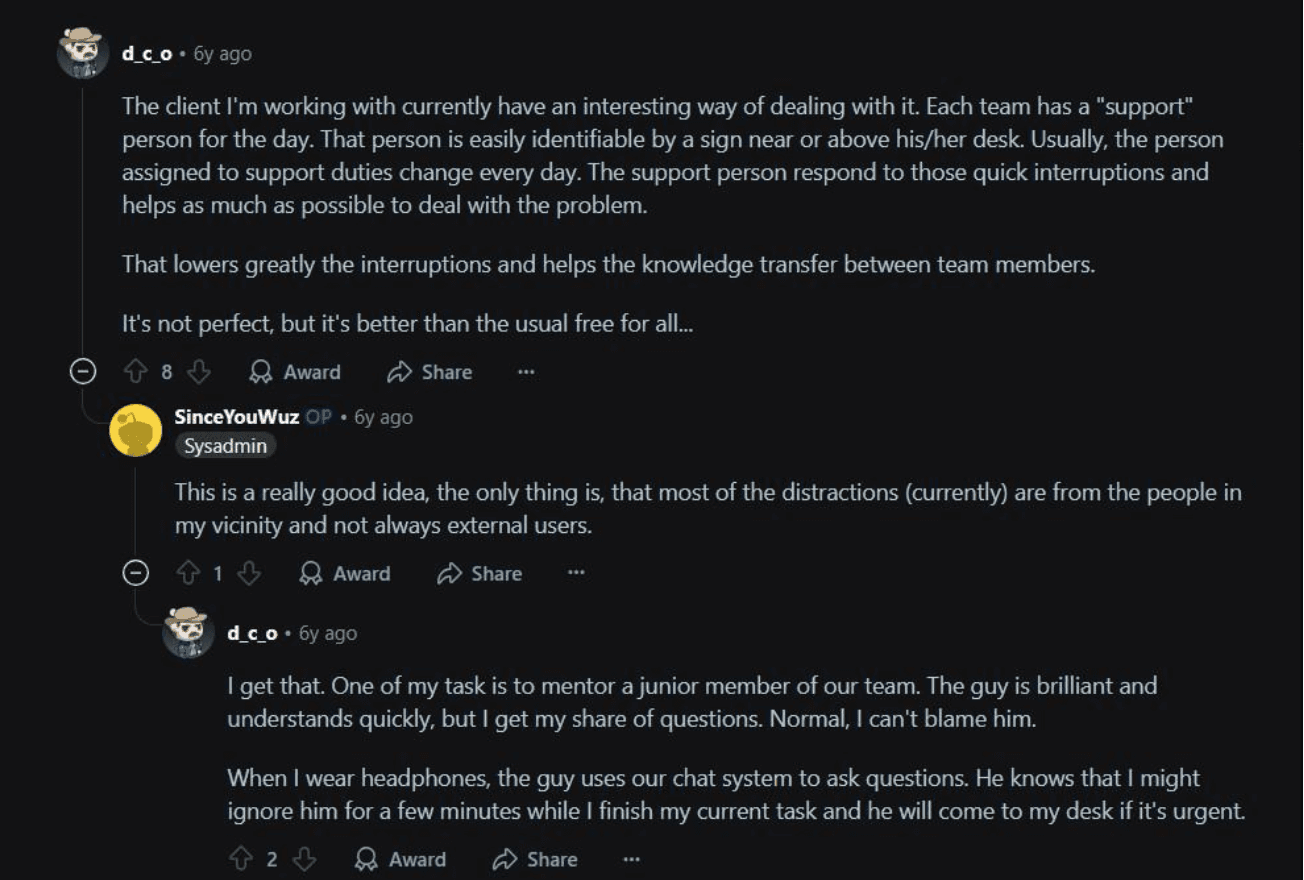
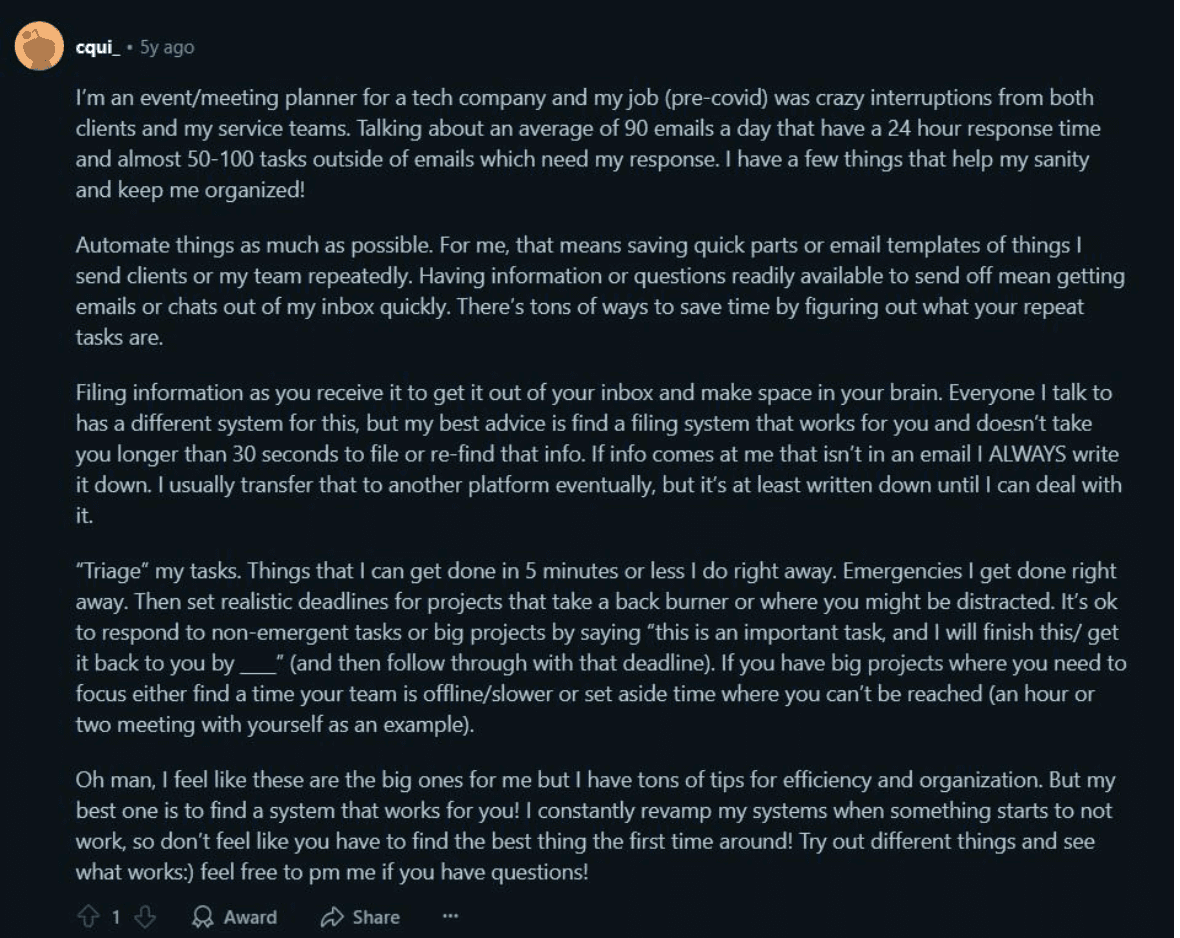
Observational Study
Observational Study
users frequently resort to ad hoc workarounds for fragmented tools, face bottlenecks from unresponsive approvals, experience cognitive overload from context switching, and share informal strategies to manage scattered workflows.
users frequently resort to ad hoc workarounds for fragmented tools, face bottlenecks from unresponsive approvals, experience cognitive overload from context switching, and share informal strategies to manage scattered workflows.
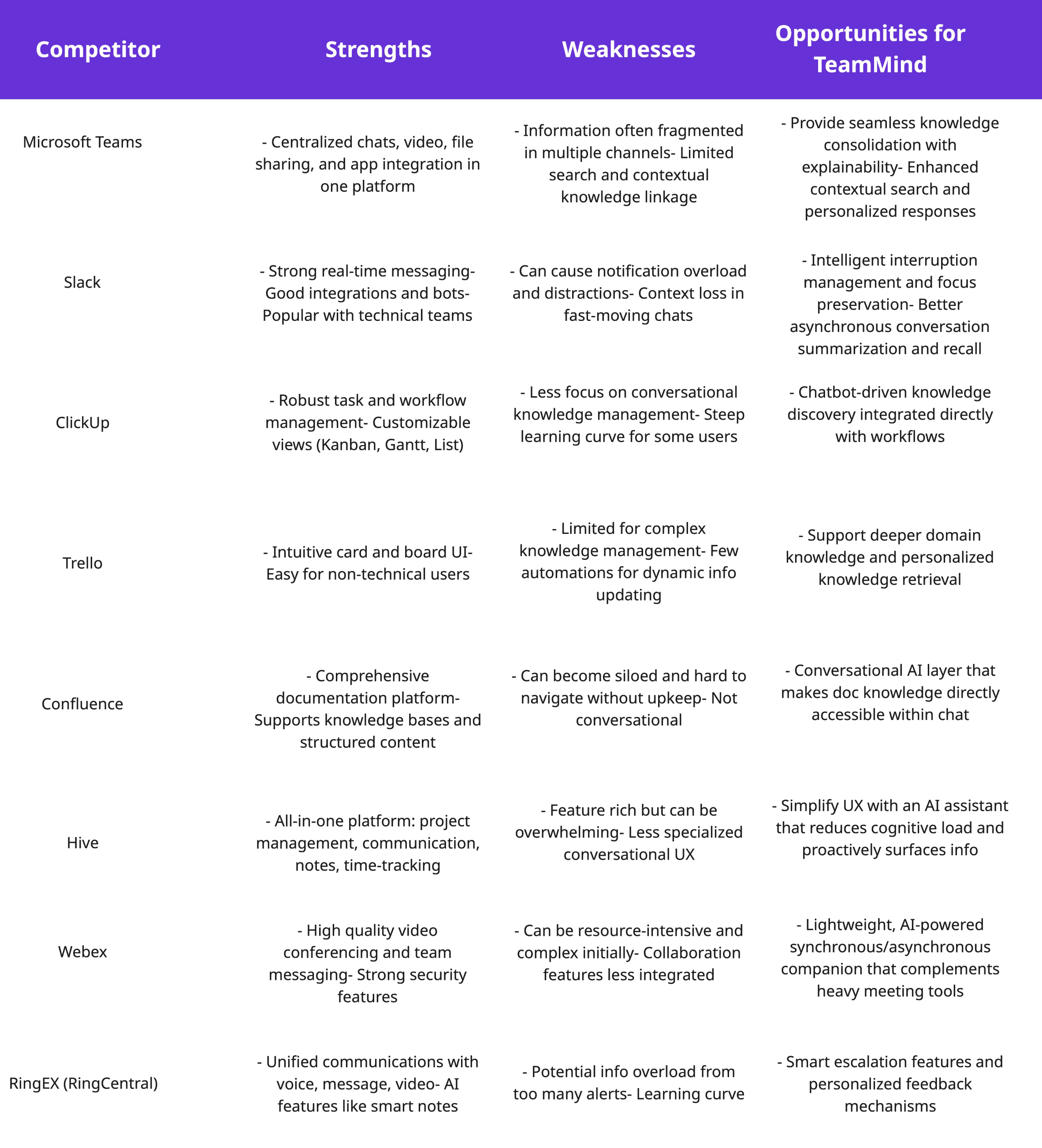
Understanding the competitive landscape was essential to ensure that the design of TeamMind strategically addresses unmet user needs and capitalises on opportunities identified through user research.
Understanding the competitive landscape was essential to ensure that the design of TeamMind strategically addresses unmet user needs and capitalises on opportunities identified through user research.
Competitor Analysis
Competitor Analysis
Insights showed users depended on multiple fragmented tools for managing documents, conversations, and approvals. Despite some functionality, these tools suffered from disjointed workflows, delayed asynchronous communication, and frequent interruptions that disrupted focus.
Insights showed users depended on multiple fragmented tools for managing documents, conversations, and approvals. Despite some functionality, these tools suffered from disjointed workflows, delayed asynchronous communication, and frequent interruptions that disrupted focus.
Insights
Users revealed dependence on multiple fragmented tools to manage documents,
conversations, and approvals. While these platforms provided certain functional
benefits, pervasive frustrations emerged around disjointed workflows, delayed
asynchronous communication, and frequent interruptions breaking user focus.
Insights
Users revealed dependence on multiple fragmented tools to manage documents,
conversations, and approvals. While these platforms provided certain functional
benefits, pervasive frustrations emerged around disjointed workflows, delayed
asynchronous communication, and frequent interruptions breaking user focus.
Insights
Users revealed dependence on multiple fragmented tools to manage documents,
conversations, and approvals. While these platforms provided certain functional
benefits, pervasive frustrations emerged around disjointed workflows, delayed
asynchronous communication, and frequent interruptions breaking user focus.
Synthesising research from interviews, observational studies, and competitor analysis led to three clear problem statements: distributed teams struggle with fragmented knowledge, asynchronous workflow bottlenecks, and constant interruptions.
Synthesising research from interviews, observational studies, and competitor analysis led to three clear problem statements: distributed teams struggle with fragmented knowledge, asynchronous workflow bottlenecks, and constant interruptions.
User Persona and User Journey Map
User Persona and User Journey Map
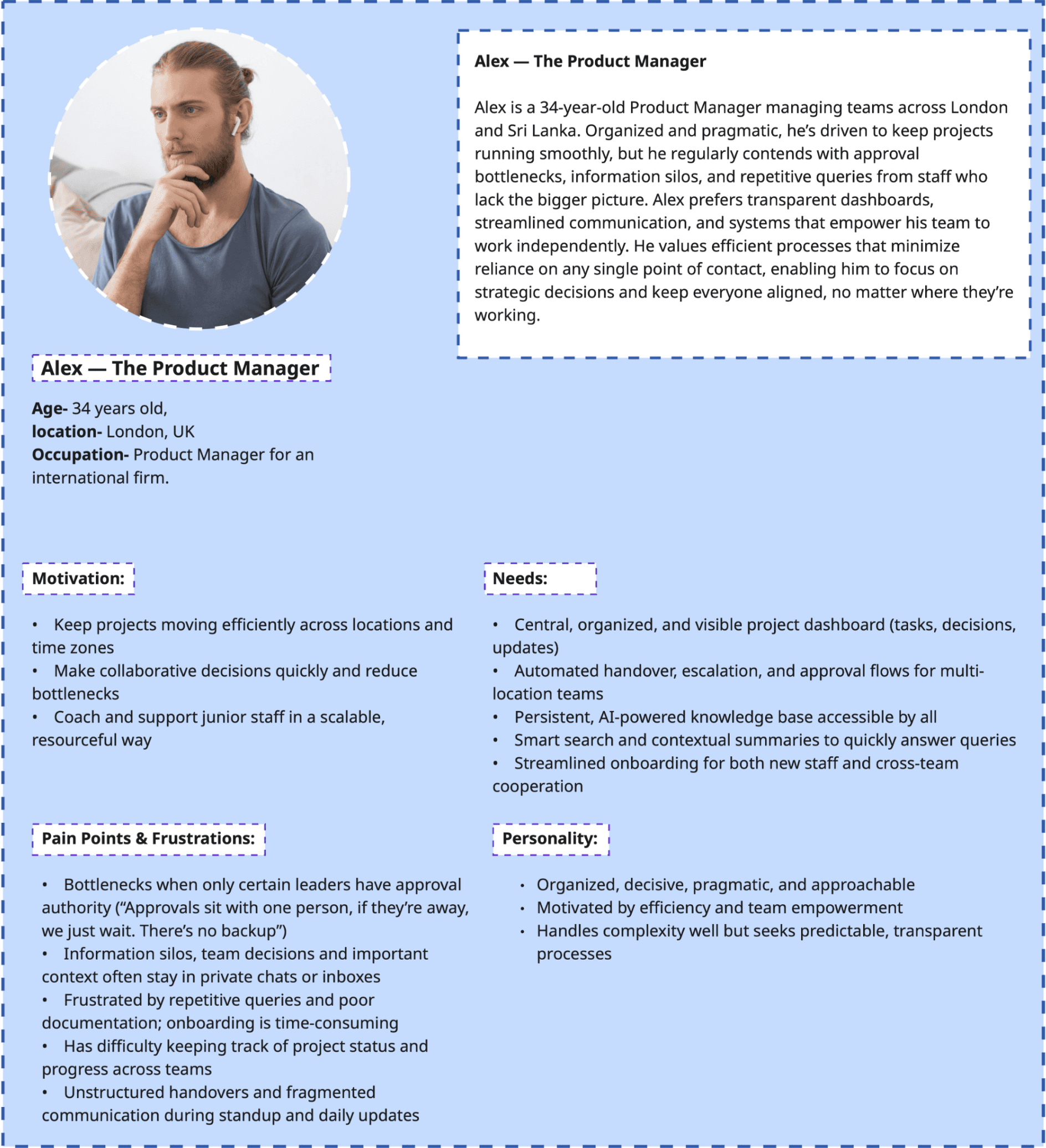
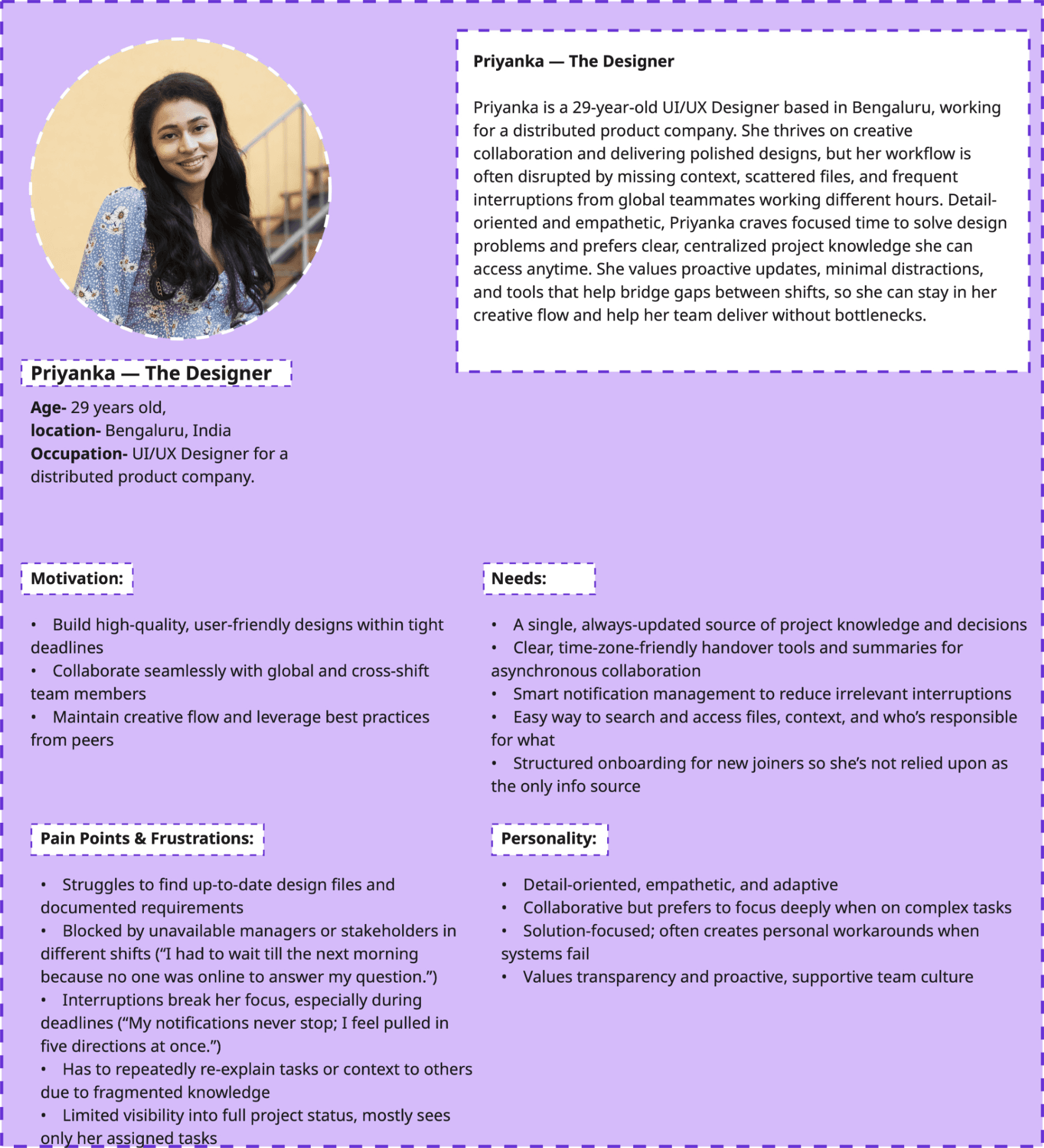
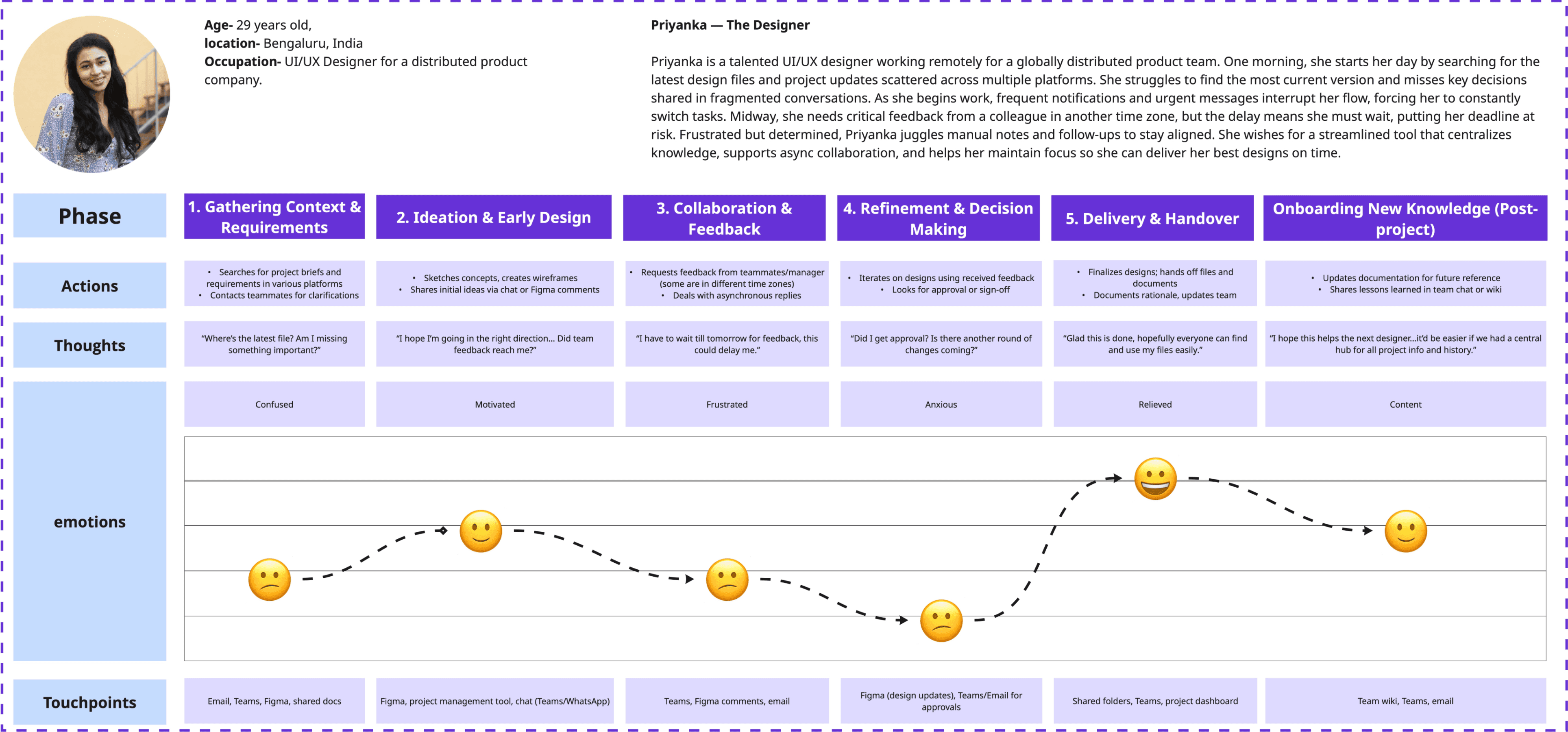
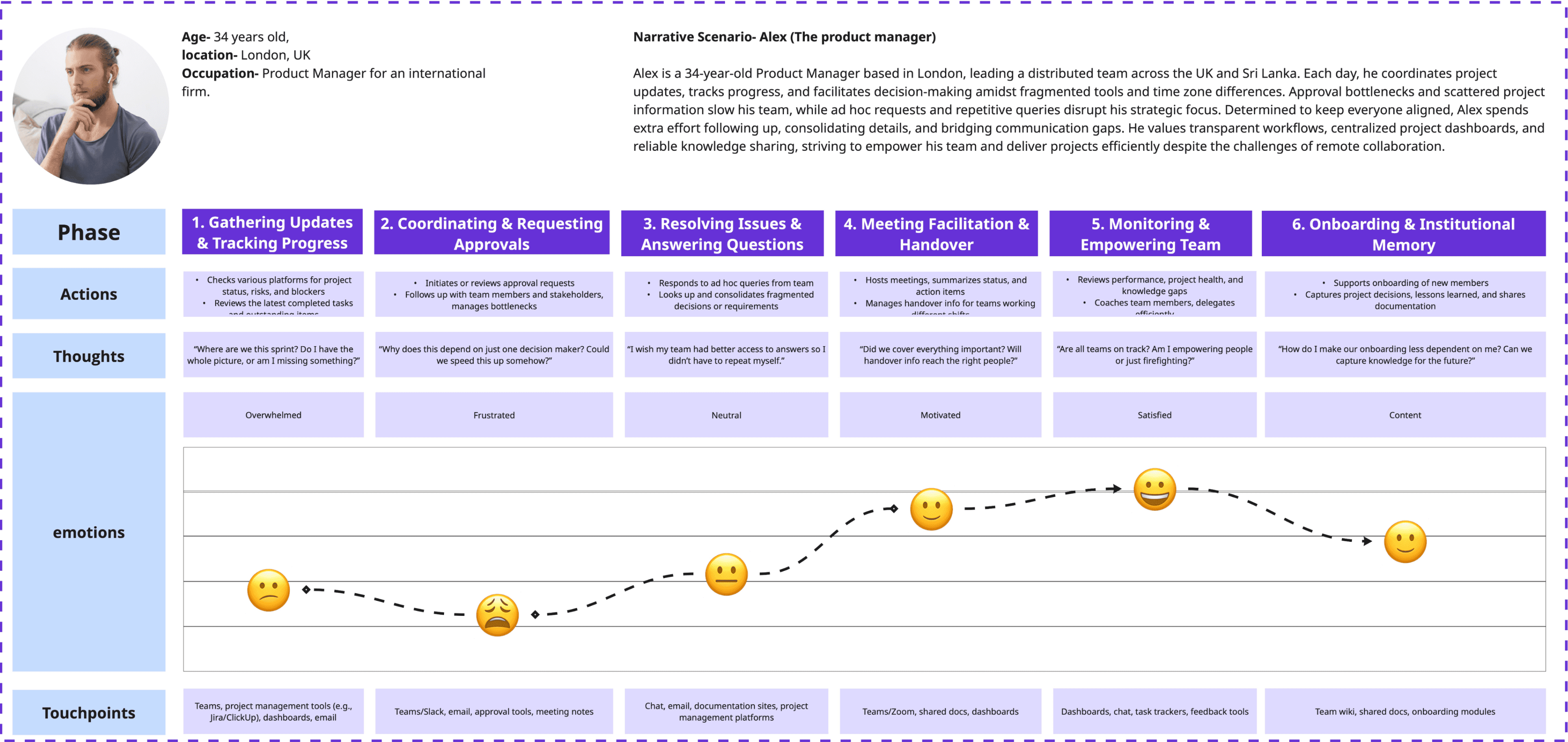
By mapping user journeys and creating key personas, I distilled the need for frictionless, self-serve access to project knowledge and smarter asynchronous collaboration. These insights framed the foundation for ideation and shaped every design decision moving forward.
By mapping user journeys and creating key personas, I distilled the need for frictionless, self-serve access to project knowledge and smarter asynchronous collaboration. These insights framed the foundation for ideation and shaped every design decision moving forward.
User Persona
User Persona
User Journey Map
User Journey Map
Key insights from the define stage, persistent knowledge fragmentation, the need for better async workflows, and strong user desire for autonomy, framed the problem space. These learnings became the springboard for ideation.
Key insights from the define stage, persistent knowledge fragmentation, the need for better async workflows, and strong user desire for autonomy, framed the problem space. These learnings became the springboard for ideation.
Ideation
Ideation
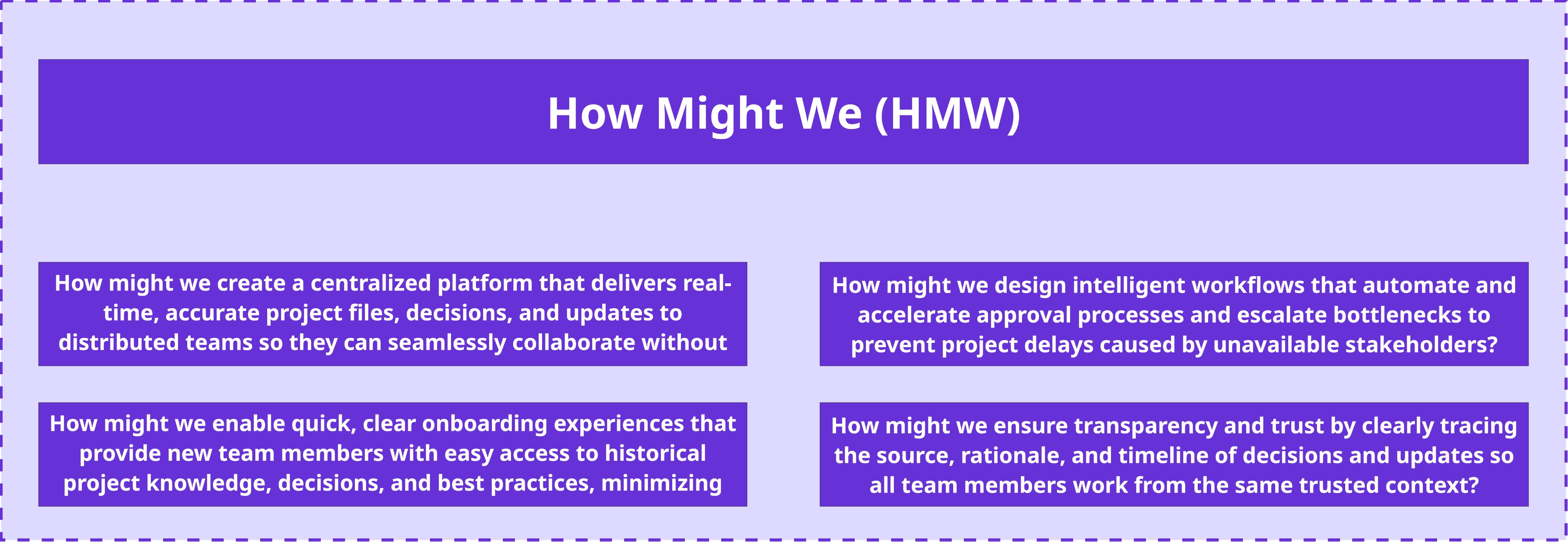
Using brainstorming and “How Might We” prompts, a wide range of solutions were generated and then rapidly sketched using the Crazy 8s method. The most promising ideas—centralised knowledge retrieval, automated approval workflows, and intuitive onboarding, were prioritised for their user value and ability to eliminate workflow pain points.
Using brainstorming and “How Might We” prompts, a wide range of solutions were generated and then rapidly sketched using the Crazy 8s method. The most promising ideas—centralised knowledge retrieval, automated approval workflows, and intuitive onboarding, were prioritised for their user value and ability to eliminate workflow pain points.
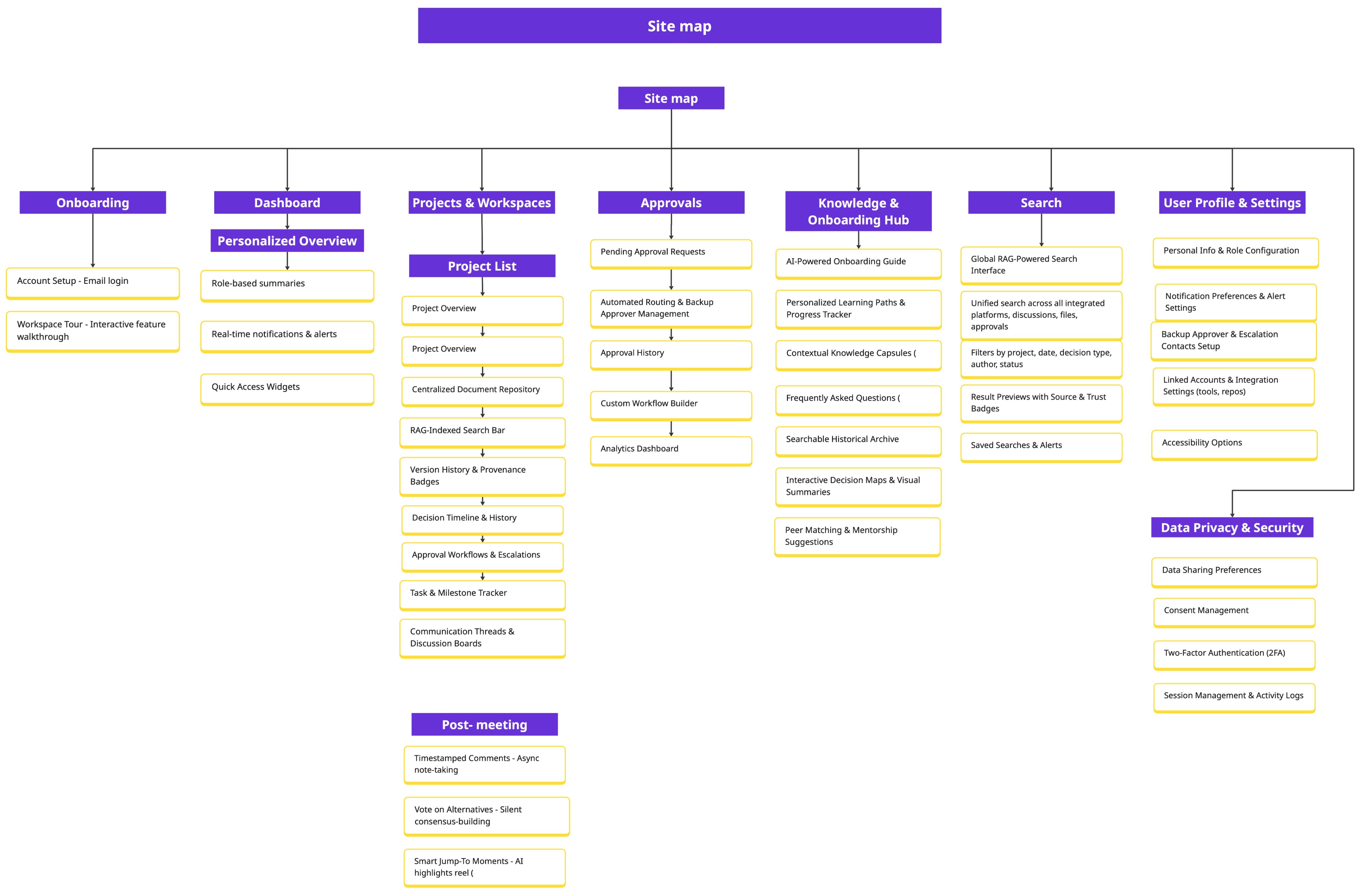
After brainstorming, I mapped out the key features into an initial information architecture and validated it with users through a card sorting activity.
After brainstorming, I mapped out the key features into an initial information architecture and validated it with users through a card sorting activity.
Insights
the card sorting revealed the need for simplified, familiar labels and the consolidation of overlapping features to reduce user confusion.
Users naturally grouped related functions such as approvals, documents, and discussions, indicating a preference for workflow-centric organisation.
Insights
the card sorting revealed the need for simplified, familiar labels and the consolidation of overlapping features to reduce user confusion.
Users naturally grouped related functions such as approvals, documents, and discussions, indicating a preference for workflow-centric organisation.
Insights
the card sorting revealed the need for simplified, familiar labels and the consolidation of overlapping features to reduce user confusion.
Users naturally grouped related functions such as approvals, documents, and discussions, indicating a preference for workflow-centric organisation.
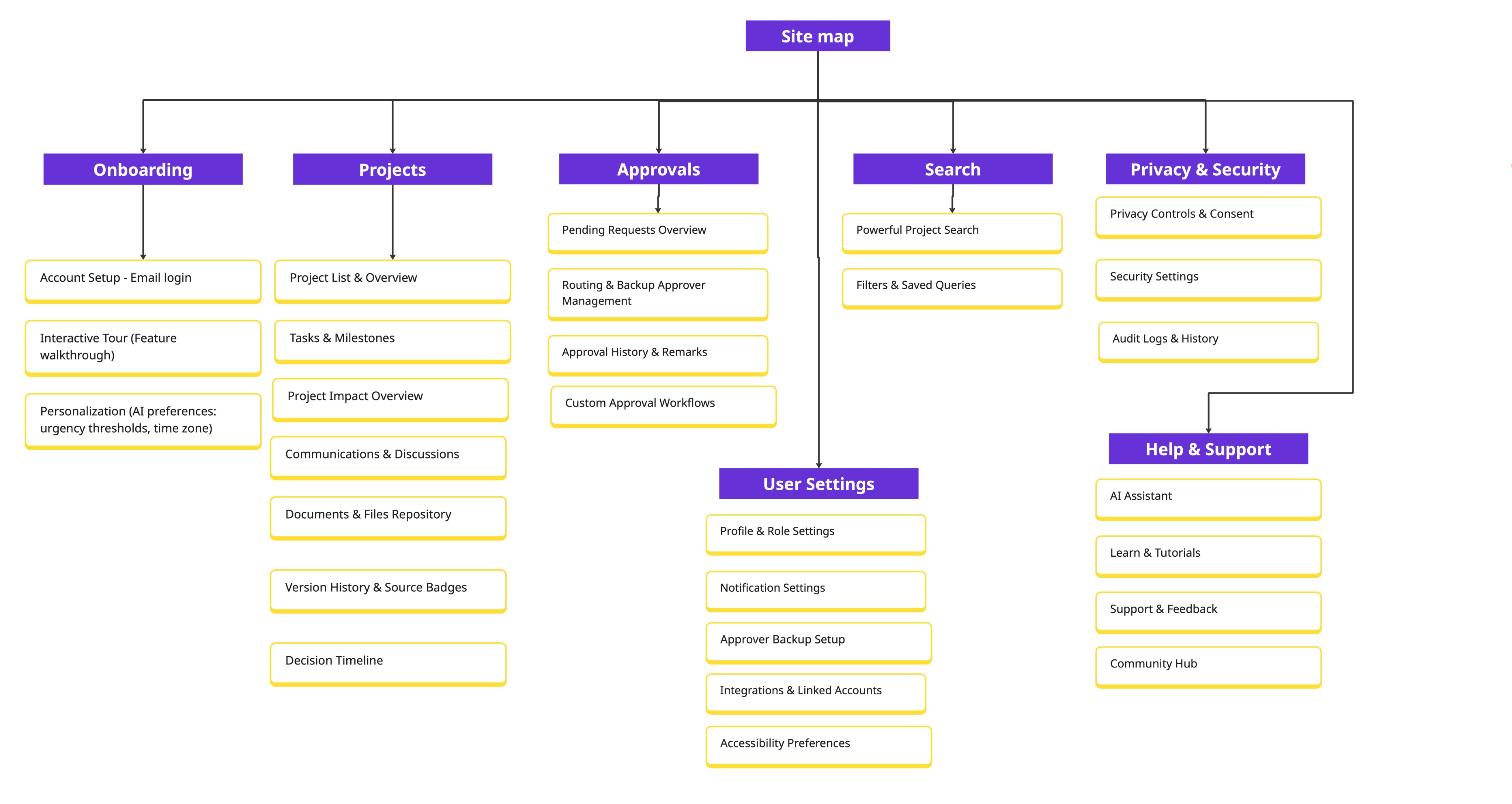
Final Information Architecture
Final Information Architecture
Insights showed the need for simpler, more familiar labels and clearer grouping of related functions like approvals, documents, and discussions. These learnings shaped a workflow-centric, user-friendly IA that enhanced discoverability and set a strong foundation for the interface.
Insights showed the need for simpler, more familiar labels and clearer grouping of related functions like approvals, documents, and discussions. These learnings shaped a workflow-centric, user-friendly IA that enhanced discoverability and set a strong foundation for the interface.
After refining the information architecture, I created wireframes to visualise and test the new layout and workflows.
After refining the information architecture, I created wireframes to visualise and test the new layout and workflows.
Wireframes
Wireframes
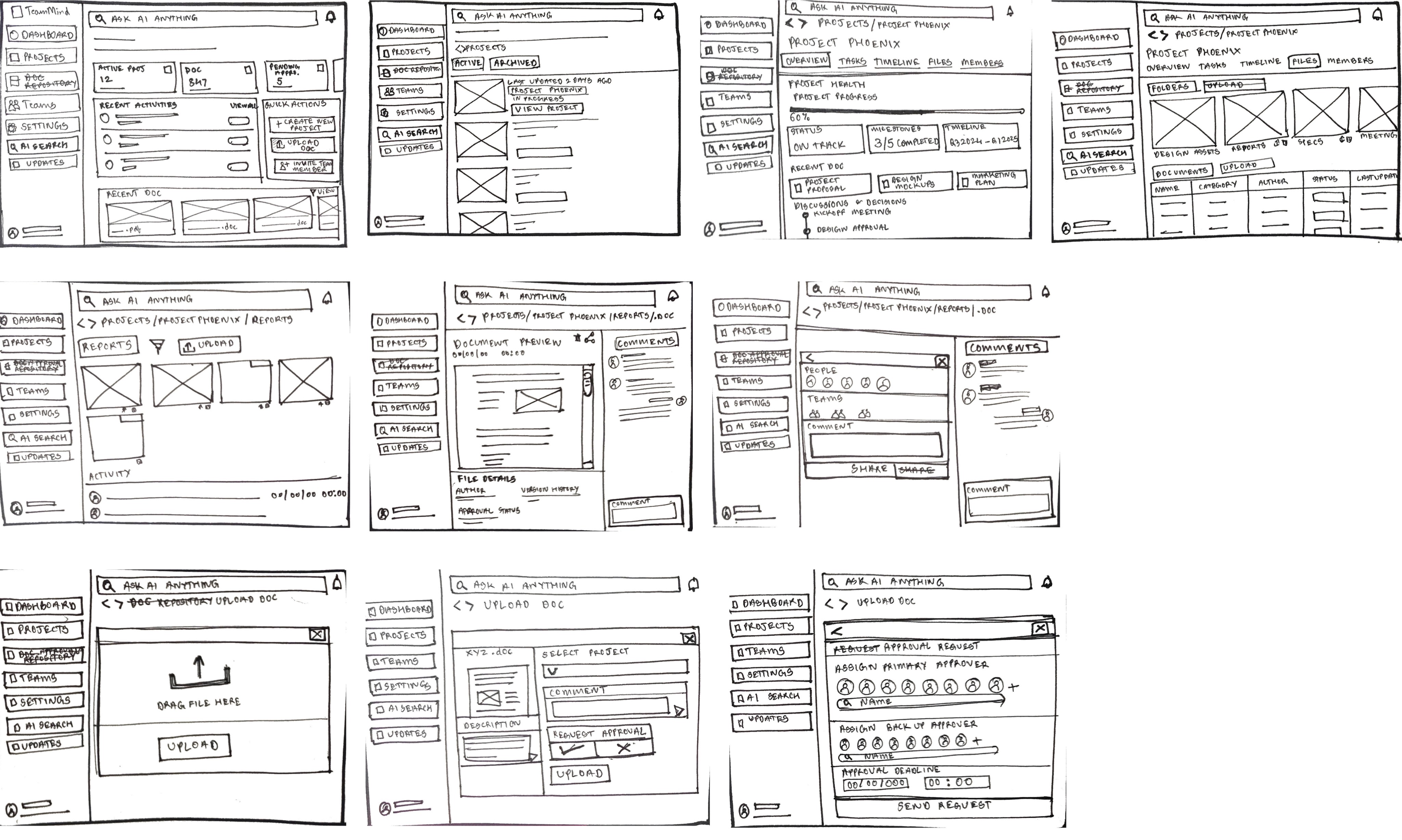
Building on the wireframes, I developed detailed high-fidelity screens embodying the finalised UI, and workflow clarity. These polished prototypes were put to the test through usability sessions with targeted users performing core tasks around document retrieval, approval workflows, and onboarding.
Building on the wireframes, I developed detailed high-fidelity screens embodying the finalised UI, and workflow clarity. These polished prototypes were put to the test through usability sessions with targeted users performing core tasks around document retrieval, approval workflows, and onboarding.
Usability Testing
Usability Testing
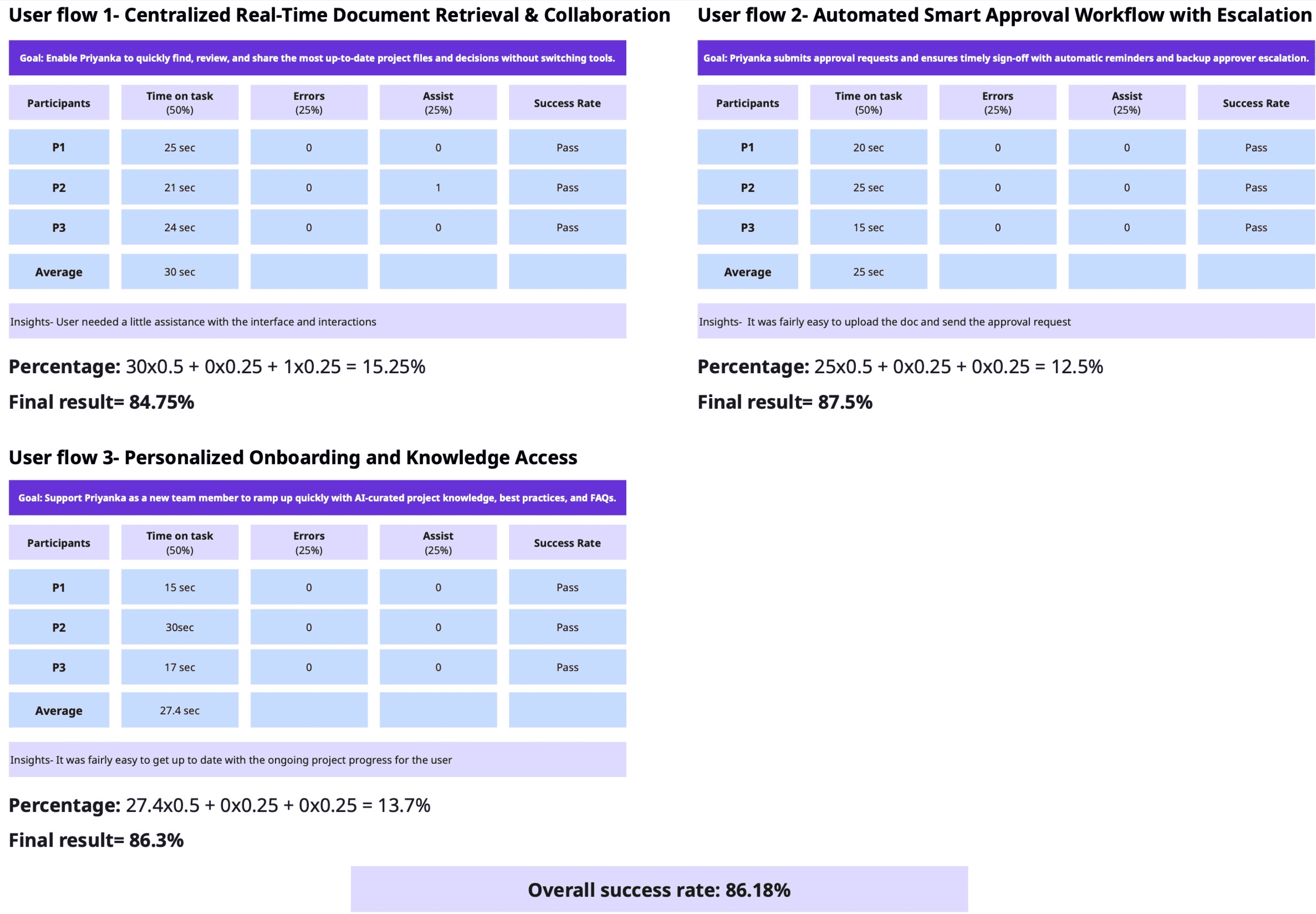
Performance metrics included task completion time (measured in seconds), the incidence of errors, and instances necessitating participant assistance. A weighted scoring algorithm was applied to these metrics to derive a final score for each hypothesis, where the performance metrics time on task, errors, and assists were weighted 50%, 25%, and 25%, respectively. This final score was calculated as equal to 100 per cent (sum of weighted results). This approach facilitated a nuanced evaluation of usability attributes, emphasising efficiency and accuracy.
The three specific user flows tested comprised:
Centralised Real-Time Document Retrieval & Collaboration (resulting 84.75%)
Automated Smart Approval Workflow with Escalation (resulting 87.5%)
Personalised Onboarding and Knowledge Access (resulting 86.3%)
The three specific user flows tested comprised:
Centralised Real-Time Document Retrieval & Collaboration (resulting 84.75%)
Automated Smart Approval Workflow with Escalation (resulting 87.5%)
Personalised Onboarding and Knowledge Access (resulting 86.3%)
The three specific user flows tested comprised:
Centralised Real-Time Document Retrieval & Collaboration (resulting 84.75%)
Automated Smart Approval Workflow with Escalation (resulting 87.5%)
Personalised Onboarding and Knowledge Access (resulting 86.3%)
Dashboard with Recent Activities & Quick Actions
Presents an overview of ongoing projects, urgent tasks, recent activity, and quick actions like creating projects or uploading documents. This boosts user autonomy, reduces mental load, and helps users stay focused without frequent context switches.
Projects Overview Screen
Centralizes access to all active and archived projects, enabling users to quickly locate and switch between project workspaces. This tackles knowledge fragmentation by bringing all projects into one unified entry point.
Document Details, Sharing & Collaboration Panel
By allowing users to add comments and tag teammates directly on a project file, this screen centralizes collaboration around key documents. Team discussions and feedback are anchored to files, reducing interruptions and making asynchronous teamwork efficient. Approval status and author details at the bottom reinforce transparency and traceability.
Document Upload & Approval Request
This screen allows users to upload new documents with a custom description, assign the document to a specific project, and instantly request approval with a single click. By streamlining file addition and approval initiation, it reduces bottlenecks and makes it easy for team members to keep important project files current and visible, supporting efficient collaboration and proactive workflow management.
Document Upload & Approval Workflow Screen
This is the document approval workflow screen, where users assign both primary and backup approvers and set deadlines for review. The interface automates and streamlines document approval requests, minimizing bottlenecks and delays in project progress, and reducing dependency on single individuals.
AI Search Library & Contextual Document Threads
The AI Search library view presents contextual document threads and saved responses. It smartly organises project documentation, supporting fast retrieval of project knowledge and simplifying onboarding for distributed teams. Users save time and maintain productivity with relevant, organised document insights.
AI-Powered Project Knowledge Query
This screen enables users to directly query recent approvals and project documentation using an AI-powered search bar. By surfacing the latest approved documentation in response to a natural language request, it tackles knowledge fragmentation and empowers new or existing team members to quickly access key project information without manual searching.
Prompt Refinement and Grounding
The AI proactively asks clarifying questions, prompting users to refine their input and establish common ground, thereby reducing miscommunication
Non-Linear Exploration via Branching Tabs
Users can highlight any text within the conversation, triggering a prompt to open a new tab for a parallel, related search.
Each new tab represents a branching topic that can be explored independently, supporting open-ended, multi-level investigation